

Testing suspending functions in most cases is not different from testing blocking functions. Take a look at the
fetchUserData below from FetchUserUseCase. Checking whether it shows data as expected can be easily achieved thanks to a few fakes[^210_1] (or mocks[^210_2]) and simple assertions. The only difference is that we need to wrap our tests with runBlocking or runTest to start a coroutine.import kotlinx.coroutines.async import kotlinx.coroutines.coroutineScope import kotlinx.coroutines.runBlocking import org.junit.Test import kotlin.test.assertEquals //sampleStart class FetchUserUseCase( private val repo: UserDataRepository, ) { suspend fun fetchUserData(): User = coroutineScope { val name = async { repo.getName() } val friends = async { repo.getFriends() } val profile = async { repo.getProfile() } User( name = name.await(), friends = friends.await(), profile = profile.await() ) } } class FetchUserDataTest { @Test fun `should construct user`() = runBlocking { // given val repo = FakeUserDataRepository() val useCase = FetchUserUseCase(repo) // when val result = useCase.fetchUserData() // then val expectedUser = User( name = "Ben", friends = listOf(Friend("some-friend-id-1")), profile = Profile("Example description") ) assertEquals(expectedUser, result) } class FakeUserDataRepository : UserDataRepository { override suspend fun getName(): String = "Ben" override suspend fun getFriends(): List<Friend> = listOf(Friend("some-friend-id-1")) override suspend fun getProfile(): Profile = Profile("Example description") } } //sampleEnd interface UserDataRepository { suspend fun getName(): String suspend fun getFriends(): List<Friend> suspend fun getProfile(): Profile } data class User( val name: String, val friends: List<Friend>, val profile: Profile ) data class Friend(val id: String) data class Profile(val description: String)
My method for testing logic should not be used as a reference. There are many conflicting ideas for how tests should look. I've used fakes here instead of mocks so as not to introduce any external library. I've also tried to keep all tests minimalistic to make them easier to read.
Similarly, in many other cases, if we are interested in what the suspending function does, we practically need nothing else but
runBlocking and classic tools for asserting. This is what unit tests look like in many projects. Here is an example facade test from Kt. Academy backend:class UserTests : KtAcademyFacadeTest() { @Test fun `should modify user details`() = runBlocking { // given thereIsUser(aUserToken, aUserId) // when facade.updateUserSelf( aUserToken, PatchUserSelfRequest( bio = aUserBio, bioPl = aUserBioPl, publicKey = aUserPublicKey, customImageUrl = aCustomImageUrl ) ) // then with(findUser(aUserId)) { assertEquals(aUserBio, bio) assertEquals(aUserBioPl, bioPl) assertEquals(aUserPublicKey, publicKey) assertEquals(aCustomImageUrl, customImageUrl) } } //... }
Integration tests can be implemented in the same way. We just use
runBlocking, and there is nearly no difference between testing how suspending and blocking functions behave.The difference arises when we want to start testing time dependencies. For example, think of the following functions:
suspend fun produceCurrentUserSync(): User {
    val profile = repo.getProfile()
    val friends = repo.getFriends()
    return User(profile, friends)
}

suspend fun produceCurrentUserAsync(): User = coroutineScope {
    val profile = async { repo.getProfile() }
    val friends = async { repo.getFriends() }
    User(profile.await(), friends.await())
}
Both functions produce the same result; the difference is that the first one is fetching the profile and the friends synchronously, while the second one does it asynchronously. Effectively, the difference is that if fetching the profile takes X milliseconds, and fetching the friends takes Y milliseconds, then the first function would require X + Y milliseconds, whereas the second one would require max(X, Y) milliseconds.
Notice that the difference arises only when execution of
getProfile and getFriends truly takes some time. If they are immediate, both ways of producing the user are indistinguishable. So, to test the real difference between them, we might help ourselves by delaying fake functions using delay, to simulate a delayed data loading scenario:class FakeDelayedUserDataRepository : UserDataRepository { override suspend fun getProfile(): Profile { delay(1000) return Profile("Example description") } override suspend fun getFriends(): List<Friend> { delay(1000) return listOf(Friend("some-friend-id-1")) } }
Now, the difference will be visible in unit tests: the
produceCurrentUserSync call will take around 2 seconds, and the produceCurrentUserAsync call will take around 1 second. The problem is that we do not want a single unit test to take so much time. We typically have thousands of unit tests in our projects, and we want all of them to execute as quickly as possible. How to have your cake and eat it too? For that, we need to operate in simulated time. Here comes the kotlinx-coroutines-test library to the rescue with its StandardTestDispatcher.This chapter presents the kotlinx-coroutines-test functions and classes introduced in version 1.6. If you use an older version of this library, in most cases it should be enough to userunBlockingTestinstead ofrunTest,TestCoroutineDispatcherinstead ofStandardTestDispatcher, andTestCoroutineScopeinstead ofTestScope. Also,advanceTimeByin older versions is likeadvanceTimeByandrunCurrentin versions newer than 1.6. The detailed differences are described in the migration guide at https://github.com/Kotlin/kotlinx.coroutines/blob/master/kotlinx-coroutines-test/MIGRATION.md.
When we call
delay, our coroutine is suspended and resumed after a set time. This behavior can be altered thanks to TestCoroutineScheduler from kotlinx-coroutines-test, which makes delay operate in virtual time, which is fully simulated and does not depend on real time. This virtual time is manually advanced by us, using functions like advanceTimeBy or advanceUntilIdle.import kotlinx.coroutines.test.TestCoroutineScheduler fun main() { val scheduler = TestCoroutineScheduler() println(scheduler.currentTime) // 0 scheduler.advanceTimeBy(1_000) println(scheduler.currentTime) // 1000 scheduler.advanceTimeBy(1_000) println(scheduler.currentTime) // 2000 }
To use
TestCoroutineScheduler on coroutines, we should use a dispatcher that supports it. The standard option is StandardTestDispatcher. Unlike most dispatchers, it is not used just to decide on which thread a coroutine should run. Coroutines started with such a dispatcher will not run until we advance its schedulers' virtual time. The most typical way to do this is by using advanceUntilIdle, which advances virtual time and invokes all the operations from those coroutines.import kotlinx.coroutines.* import kotlinx.coroutines.test.* fun main() { val scheduler = TestCoroutineScheduler() val testDispatcher = StandardTestDispatcher(scheduler) CoroutineScope(testDispatcher).launch { println("Some work 1") delay(1000) println("Some work 2") delay(1000) println("Coroutine done") } CoroutineScope(testDispatcher).launch { delay(500) println("Different work") } println("[${scheduler.currentTime}] Before") scheduler.advanceUntilIdle() println("[${scheduler.currentTime}] After") } // [0] Before // Some work 1 // Different work // Some work 2 // Coroutine done // [2000] After
The result time in scheduler is the sum of all delays, it represents how much time those coroutines would take in real time. However, it is a virtual time, so the time is precise and does not depend on the real time. This gives us not only efficiency, but also perfect predictability.
StandardTestDispatcher creates TestCoroutineScheduler by default, so we do not need to do so explicitly. We can access it with the scheduler property.import kotlinx.coroutines.* import kotlinx.coroutines.test.StandardTestDispatcher fun main() { val dispatcher = StandardTestDispatcher() CoroutineScope(dispatcher).launch { println("Some work 1") delay(1000) println("Some work 2") delay(1000) println("Coroutine done") } println("[${dispatcher.scheduler.currentTime}] Before") dispatcher.scheduler.advanceUntilIdle() println("[${dispatcher.scheduler.currentTime}] After") } // [0] Before // Some work 1 // Some work 2 // Coroutine done // [2000] After
It is important to notice that
StandardTestDispatcher does not advance time by itself. We need to do this, otherwise our coroutine will never be resumed.import kotlinx.coroutines.delay import kotlinx.coroutines.runBlocking import kotlinx.coroutines.test.StandardTestDispatcher fun main() { val testDispatcher = StandardTestDispatcher() runBlocking(testDispatcher) { delay(1) println("Coroutine done") } } // (code runs forever)
Another way to push time is using
advanceTimeBy with a concrete number of milliseconds. This function advances time and executes all operations that happened in the meantime. This means that if we push by 2 milliseconds, everything that was delayed by less than that time will be resumed. To resume operations scheduled exactly at the second millisecond, we need to additionally invoke the runCurrent function.import kotlinx.coroutines.delay import kotlinx.coroutines.CoroutineScope import kotlinx.coroutines.launch import kotlinx.coroutines.test.StandardTestDispatcher fun main() { val testDispatcher = StandardTestDispatcher() CoroutineScope(testDispatcher).launch { delay(1) println("Done1") } CoroutineScope(testDispatcher).launch { delay(2) println("Done2") } testDispatcher.scheduler.advanceTimeBy(2) // Done testDispatcher.scheduler.runCurrent() // Done2 }
Here is a bigger example of using
advanceTimeBy together with runCurrent.import kotlinx.coroutines.delay import kotlinx.coroutines.CoroutineScope import kotlinx.coroutines.launch import kotlinx.coroutines.test.StandardTestDispatcher fun main() { val testDispatcher = StandardTestDispatcher() CoroutineScope(testDispatcher).launch { delay(2) print("Done") } CoroutineScope(testDispatcher).launch { delay(4) print("Done2") } CoroutineScope(testDispatcher).launch { delay(6) print("Done3") } for (i in 1..5) { print(".") testDispatcher.scheduler.advanceTimeBy(1) testDispatcher.scheduler.runCurrent() } } // ..Done..Done2.
How does it work under the hood? Whendelayis called, it checks if the dispatcher (class withContinuationInterceptorkey) implements theDelayinterface (StandardTestDispatcherdoes). For such dispatchers, it calls theirscheduleResumeAfterDelayfunction instead of the one from theDefaultDelay, which waits in real time.
To see that virtual time is truly independent of real time, see the example below. Adding
Thread.sleep will not influence the coroutine with StandardTestDispatcher. Note also that the call to advanceUntilIdle takes only a few milliseconds, so it does not wait for any real time. It immediately pushes the virtual time and executes coroutine operations.import kotlinx.coroutines.* import kotlinx.coroutines.test.StandardTestDispatcher import kotlin.random.Random import kotlin.system.measureTimeMillis fun main() { val dispatcher = StandardTestDispatcher() CoroutineScope(dispatcher).launch { delay(1000) println("Coroutine done") } Thread.sleep(Random.nextLong(2000)) // Does not matter // how much time we wait here, it will not influence // the result val time = measureTimeMillis { println("[${dispatcher.scheduler.currentTime}] Before") dispatcher.scheduler.advanceUntilIdle() println("[${dispatcher.scheduler.currentTime}] After") } println("Took $time ms") } // [0] Before // Coroutine done // [1000] After // Took 15 ms (or other small number)
In the previous examples, we were using
StandardTestDispatcher and wrapping it with a scope. Instead, we could use TestScope, which does the same (and it collects all exceptions with CoroutineExceptionHandler). The trick is that on this scope we can also use functions like advanceUntilIdle, advanceTimeBy, or the currentTime property , all of which are delegated to the scheduler used by this scope. This is very convenient.import kotlinx.coroutines.delay import kotlinx.coroutines.launch import kotlinx.coroutines.test.* fun main() { val scope = TestScope() scope.launch { delay(1000) println("First done") delay(1000) println("Coroutine done") } println("[${scope.currentTime}] Before") // [0] Before scope.advanceTimeBy(1000) scope.runCurrent() // First done println("[${scope.currentTime}] Middle") // [1000] Middle scope.advanceUntilIdle() // Coroutine done println("[${scope.currentTime}] After") // [2000] After }
We will later see that
StandardTestDispatcher is often used directly on Android to test ViewModels, Presenters, Fragments, etc. We could also use it to test the produceCurrentUserSync and produceCurrentUserAsync functions by starting them in a coroutine, advancing time until idle, and checking how much simulated time they took. However, this would be quite complicated; instead, we should use runTest, which is designed for such purposes.runTest is the most commonly used function from kotlinx-coroutines-test. It starts a coroutine with TestScope and immediately advances it until idle. Within its coroutine, the scope is of type TestScope, so we can check currentTime at any point. Therefore, we can check how time flows in our coroutines, while our tests take milliseconds. Effectively, runTest behaves like runBlocking, but it operates on virtual time. The below tests will pass immediately (in a couple of milliseconds), and the currentTime will be precisely as expected.class TestTest { @Test fun test1() = runTest { assertEquals(0, currentTime) delay(1000) assertEquals(1000, currentTime) } @Test fun test2() = runTest { assertEquals(0, currentTime) coroutineScope { launch { delay(1000) } launch { delay(1500) } launch { delay(2000) } } assertEquals(2000, currentTime) } }
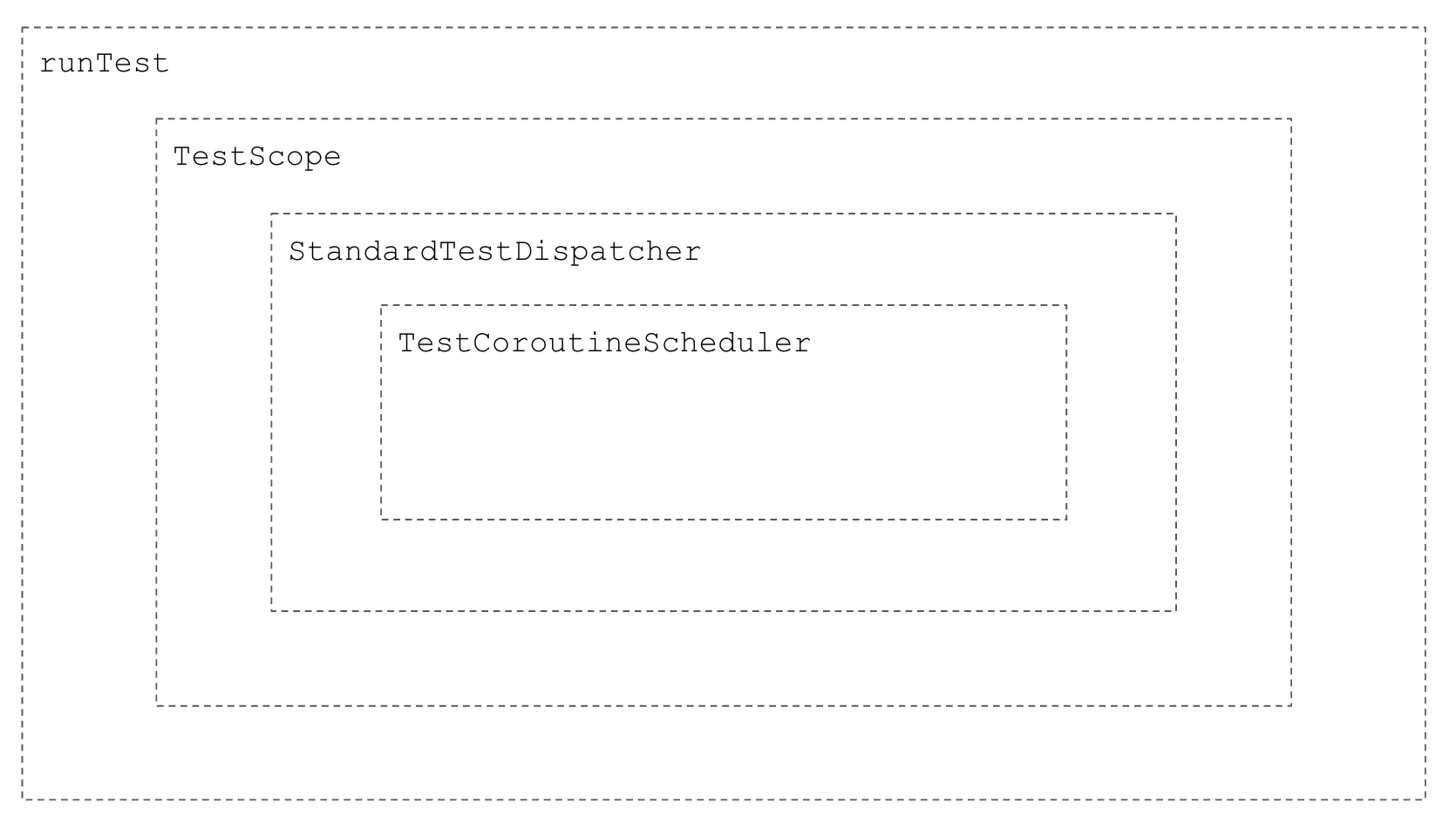
runTest includes TestScope, that includes StandardTestDispatcher, that includes TestCoroutineScheduler.Let's get back to our functions, where we loaded user data sequentially and simultaneously. With
runTest, testing them is easy. Assuming that our fake repository needs 1 second for each function call, synchronous processing should take 2 seconds, and asynchronous processing should take only 1. Again, thanks to the fact we are using virtual time, our tests are immediate, and the values of currentTime are precise.private val userDataRepository = FakeDelayedUserDataRepository() private val useCase = ProduceUserUseCase(userDataRepository) @Test fun `Should produce user synchronously`() = runTest { // when useCase.produceCurrentUserSync() // then assertEquals(2000, currentTime) } @Test fun `Should produce user asynchronous`() = runTest { // when useCase.produceCurrentUserAsync() // then assertEquals(1000, currentTime) }
Since it is an important use case, let's see a full example of testing a sequential function with all required classes and interfaces:
class FetchUserUseCase(
    private val repo: UserDataRepository,
) {

    suspend fun fetchUserData(): User = coroutineScope {
        val name = async { repo.getName() }
        val friends = async { repo.getFriends() }
        val profile = async { repo.getProfile() }
        User(
            name = name.await(),
            friends = friends.await(),
            profile = profile.await()
        )
    }
}

class FetchUserDataTest {

    @Test
    fun `should fetch user concurrently`() = runTest {
        // given
        val userRepo = FakeUserDataRepository()
        val useCase = FetchUserUseCase(userRepo)

        // when
        val result = useCase.fetchUserData()

        // then correct data are returned
        val expectedUser = User(
            name = "Ben",
            friends = listOf(Friend("some-friend-id-1")),
            profile = Profile("Example description")
        )
        assertEquals(expectedUser, result)

        // and all requests are made concurrently
        assertEquals(1000, currentTime)
    }

    class FakeUserDataRepository : UserDataRepository {
        override suspend fun getName(): String {
            delay(1000)
            return "Ben"
        }

        override suspend fun getFriends(): List<Friend> {
            delay(1000)
            return listOf(Friend("some-friend-id-1"))
        }

        override suspend fun getProfile(): Profile {
            delay(1000)
            return Profile("Example description")
        }
    }
}

interface UserDataRepository {
    suspend fun getName(): String
    suspend fun getFriends(): List<Friend>
    suspend fun getProfile(): Profile
}

data class User(
    val name: String,
    val friends: List<Friend>,
    val profile: Profile
)

data class Friend(val id: String)
data class Profile(val description: String)
The
runTest function creates a scope; like all such functions, it awaits the completion of its children. This means that if you start a process that never ends, your test will never stop.@Test fun `should increment counter`() = runTest { var i = 0 launch { while (true) { delay(1000) i++ } } delay(1001) assertEquals(1, i) delay(1000) assertEquals(2, i) // Test would pass if we added // coroutineContext.job.cancelChildren() }
For such situations,
runTest offers backgroundScope. This is a scope that also operates on virtual time from the same scheduler, but runTest will not treat it as its children and await its completion. This is why the test below passes without any problems. We use backgroundScope to start all the processes we don't want our test to wait for.@Test fun `should increment counter`() = runTest { var i = 0 backgroundScope.launch { while (true) { delay(1000) i++ } } delay(1001) assertEquals(1, i) delay(1000) assertEquals(2, i) }
If you want to test whether a certain function respects structured concurrency, the easiest way is to capture the context from a suspending function, then check if it contains the expected value or if its job has the appropriate state. As an example, consider the
mapAsync function, which implements asynchronous mapping of a list of elements.suspend fun <T, R> Iterable<T>.mapAsync( transformation: suspend (T) -> R ): List<R> = coroutineScope { this@mapAsync.map { async { transformation(it) } } .awaitAll() }
This function should map elements asynchronously while preserving their order. This behavior can be verified by the following test:
@Test
fun `should map async and keep elements order`() = runTest {
    val transforms = listOf(
        suspend { delay(3000); "A" },
        suspend { delay(2000); "B" },
        suspend { delay(4000); "C" },
        suspend { delay(1000); "D" },
    )

    val res = transforms.mapAsync { it() }
    assertEquals(listOf("A", "B", "C", "D"), res)
    assertEquals(4000, currentTime)
}
But this is not all. We expect a properly implemented suspending function to respect structured concurrency. The easiest way to check this is by specifying some context, like
CoroutineName, for the parent coroutine, then check that it is still the same in the transformation function. To capture the context of a suspending function, we can use the currentCoroutineContext function or the coroutineContext property. In lambda expressions nested in coroutine builders or scope functions, we should use the currentCoroutineContext function because the coroutineContext property from CoroutineScope has priority over the property that provides the current coroutine context.@Test fun `should support context propagation`() = runTest { var ctx: CoroutineContext? = null val name1 = CoroutineName("Name 1") withContext(name1) { listOf("A").mapAsync { ctx = currentCoroutineContext() it } } assertEquals(name1, ctx?.get(CoroutineName)) val name2 = CoroutineName("Some name 2") withContext(name2) { listOf(1, 2, 3).mapAsync { ctx = currentCoroutineContext() it } } assertEquals(name2, ctx?.get(CoroutineName)) }
The easiest way to test cancellation is by capturing the inner function job and verifying its cancellation after the cancellation of the outer coroutine.
@Test
fun `should support cancellation`() = runTest {
    var job: Job? = null

    val parentJob = launch {
        listOf("A").mapAsync {
            job = currentCoroutineContext().job
            delay(Long.MAX_VALUE)
        }
    }

    delay(1000)
    parentJob.cancel()
    assertEquals(true, job?.isCancelled)
}
I don't think such tests are required in most applications, but I find them useful in libraries. It's not so obvious that structured concurrency is respected. Both the tests above would fail if
async were started on an outer scope.// Incorrect implementation, that would make above tests fail suspend fun <T, R> Iterable<T>.mapAsync( transformation: suspend (T) -> R ): List<R> = this@mapAsync .map { GlobalScope.async { transformation(it) } } .awaitAll()
Except for
StandardTestDispatcher we also have UnconfinedTestDispatcher. The biggest difference is that StandardTestDispatcher does not invoke any operations until we use its scheduler. UnconfinedTestDispatcher immediately invokes all the operations before the first delay on started coroutines, which is why the code below prints "C".import kotlinx.coroutines.* import kotlinx.coroutines.test.* fun main() { CoroutineScope(StandardTestDispatcher()).launch { print("A") delay(1) print("B") } CoroutineScope(UnconfinedTestDispatcher()).launch { print("C") delay(1) print("D") } } // C
The
runTest function was introduced in version 1.6 of kotlinx-coroutines-test. Previously, we used runBlockingTest, whose behavior is much closer to runTest using UnconfinedTestDispatcher. So, if want to directly migrate from runBlockingTest to runTest, this is how our tests might look:@Test fun testName() = runTest(UnconfinedTestDispatcher()) { //... }
If you do not need that for backward compatibility, I recommend using
StandardTestDispatcher instead of UnconfinedTestDispatcher, as it is considered the new standard.Using
delay in fakes is easy but not very explicit. Many developers prefer to call delay in the test function. One way to do this is using mocks[^210_3]:@Test fun `should load data concurrently`() = runTest { // given val userRepo = mockk<UserDataRepository>() coEvery { userRepo.getName() } coAnswers { delay(600) aName } coEvery { userRepo.getFriends() } coAnswers { delay(700) someFriends } coEvery { userRepo.getProfile() } coAnswers { delay(800) aProfile } val useCase = FetchUserUseCase(userRepo) // when useCase.fetchUserData() // then assertEquals(800, currentTime) }
In the above example, I've used the MockK library.
In the Dispatchers chapter, I explained that some suspending function should specify the dispatcher they use. For example, we use
Dispatcher.IO (or a custom dispatcher) for blocking calls, or Dispatchers.Default for CPU-intensive calls:suspend fun readSave(name: String): GameState = withContext(Dispatchers.IO) { reader.readCsvBlocking(name, GameState::class.java) } suspend fun calculateModel() = withContext(Dispatchers.Default) { model.fit( dataset = newTrain, epochs = 10, batchSize = 100, verbose = false ) }
Is it possible to test if these functions truly change the dispatcher? It is, but it is not so easy. We can do that by capturing the context or the thread on a faked/mocked function that should be executed on a different dispatcher. Such checks are not common, as they are not considered very useful, but they are possible.
A more common problem is dealing with a situation when a function that changes its dispatcher needs to make a call that should take some time. The mechanism of virtual time is based on the dispatcher, so if we change it, we also change the way time is handled. That can be the case when one function both makes a blocking call and asynchronous suspending calls. Consider the below function:
suspend fun fetchUserData() = withContext(Dispatchers.IO) {
    val userId = readUserId() // blocking call
    val name = async { userRepo.getName(userId) }
    val friends = async { userRepo.getFriends(userId) }
    val profile = async { userRepo.getProfile(userId) }
    User(
        name = name.await(),
        friends = friends.await(),
        profile = profile.await()
    )
}
It you want to test that getting user name, friends, and profile is done concurrently, it is not enough to use
runTest and adding delays to fakes. It is because in fetchUserData we use Dispatchers.IO, which replaces StandardTestDispatcher from runTest. As a consequence, the delay function inside getName, getFriends, and getProfile will wait in real time, not in virtual time.This problem is not so common, but it can happen. The simplest way to overcome it, is to use a dispatcher injected to this class, instead of using
Dispatchers.IO. This way, we can replace it in unit tests with StandardTestDispatcher from runTest.class FetchUserUseCase( private val userRepo: UserDataRepository, private val ioDispatcher: CoroutineDispatcher = Dispatchers.IO ) { suspend fun fetchUserData() = withContext(ioDispatcher) { val userId = readUserId() // blocking call val name = async { userRepo.getName(userId) } val friends = async { userRepo.getFriends(userId) } val profile = async { userRepo.getProfile(userId) } User( name = name.await(), friends = friends.await(), profile = profile.await() ) } }
Now, instead of providing
Dispatchers.IO in unit tests, we should use StandardTestDispatcher from runTest. We can get it from coroutineContext using the ContinuationInterceptor key (or using experimental CoroutineDispatcher key, that uses ContinuationInterceptor and casts the result to CoroutineDispatcher).// inside runTest val testDispatcher = this .coroutineContext[ContinuationInterceptor] as CoroutineDispatcher // or //val testDispatcher = this // .coroutineContext[CoroutineDispatcher] val useCase = FetchUserUseCase( userRepo = userRepo, ioDispatcher = testDispatcher, )
Another possibility is to type
ioDispatcher as CoroutineContext, and replace it in unit tests with EmptyCoroutineContext. The final behavior will be the same, because fetchUserData function will never change dispatcher in tests, so it will implicitly StandardTestDispatcher. This solution is simpler, but some developers do not like seeing CoroutineContext as a type of dispatcher, as CoroutineDispatcher might include anything, not only a dispatcher.val useCase = FetchUserUseCase( userRepo = userRepo, ioDispatcher = EmptyCoroutineContext, )
Imagine a function which during its execution first shows a progress bar and later hides it.
suspend fun sendUserData() {
    val userData = database.getUserData()
    progressBarVisible.value = true
    userRepository.sendUserData(userData)
    progressBarVisible.value = false
}
If we only check the final result, we cannot verify that the progress bar changed its state during function execution. The trick that is helpful in such cases is to start this function in a new coroutine and control virtual time from outside. Notice that
runTest creates a coroutine with the StandardTestDispatcher dispatcher and advances its time until idle. This means that its children's time will start once the parent starts waiting for them, so once its body is finished. Before that, we can advance virtual time by ourselves. For that, we can use advanceTimeBy, runCurrent, and advanceUntilIdle.@Test fun `should show progress bar when sending data`() = runTest { // given val database = FakeDatabase() val vm = UserViewModel(database) // when launch { vm.sendUserData() } // then assertEquals(false, vm.progressBarVisible.value) // when advanceTimeBy(1000) // then assertEquals(false, vm.progressBarVisible.value) // when runCurrent() // then assertEquals(true, vm.progressBarVisible.value) // when advanceUntilIdle() // then assertEquals(false, vm.progressBarVisible.value) }
Notice that, thanks torunCurrent, we can precisely check when some value changes.
A similar effect could be achieved if we used
delay. This is like having two independent processes: one executing the operation under test, while the other is checking the side effects of this operation.@Test fun `should show progress bar when sending data`() = runTest { val database = FakeDatabase() val vm = UserViewModel(database) launch { vm.showUserData() } // then assertEquals(false, vm.progressBarVisible.value) delay(1000) assertEquals(true, vm.progressBarVisible.value) delay(1000) assertEquals(false, vm.progressBarVisible.value) }
Using explicit functions likeadvanceTimeByin such situations is considered more readable and more predictable than usingdelay, but both options are valid.
Coroutines need to start somewhere. On the backend, they are often started by the framework we use (for instance Spring or Ktor), but sometimes we might also need to construct a scope ourselves and launch coroutines on it.
@Scheduled(fixedRate = 5000)
fun sendNotifications() {
    notificationsScope.launch {
        val notifications = notificationsRepository
            .notificationsToSend()
        for (notification in notifications) {
            launch {
                notificationsService.send(notification)
                notificationsRepository
                    .markAsSent(notification.id)
            }
        }
    }
}
How can we test
sendNotifications if the notifications are truly sent concurrently? Again, in unit tests we need to use StandardTestDispatcher as part of our scope. We should also add some delays to send and markAsSent.@Test fun testSendNotifications() { // given val notifications = List(100) { Notification(it) } val repo = FakeNotificationsRepository( delayMillis = 200, notifications = notifications, ) val service = FakeNotificationsService( delayMillis = 300, ) val testScope = TestScope() val sender = NotificationsSender( notificationsRepository = repo, notificationsService = service, notificationsScope = testScope ) // when sender.sendNotifications() testScope.advanceUntilIdle() // then all notifications are sent and marked assertEquals( notifications.toSet(), service.notificationsSent.toSet() ) assertEquals( notifications.map { it.id }.toSet(), repo.notificationsMarkedAsSent.toSet() ) // and notifications are sent concurrently assertEquals(700, testScope.currentTime) }
Notice thatrunBlockingis not needed in the code above. BothsendNotificationsandadvanceUntilIdleare regular functions.
It is not uncommon that we need to test classes that both require a scope, and that expose some suspending functions. In such cases, we can use
runTest to start a coroutine, and there are two ways how we can provide a scope that operates on the same virtual time to the class we test. The first approach is to create an instance of this class in each test, and use backgroundScope as the scope.class UserDetailsRepositoryTest { @Test fun `should fetch details`() = runTest { // given val client = FakeClient() val database = InMemoryDatabase() val repo = UserDetailsRepository( client = client, database = database, scope = backgroundScope ) // ... } }
The problem with this approach is that we need to call class constructor in each test, what generates a lot of boilerplate. Some developers extract this class creation into a function, but still it is not very convenient. The second way is to create this class in the class where we define tests. This way we cannot use
backgroundScope from runTest. Instead, we create a new scope using TestScope, and we use it in runTest, by calling runTest on this scope. When runTest is used this way, it operates on the same virtual time as its receiver scope.class UserDetailsRepositoryTest { private val database = InMemoryDatabase() private val testScope = TestScope() private val repo = UserDetailsRepository( client = client, database = database, scope = testScope ) @Test fun `should fetch details`() = testScope.runTest { // ... } }
Here I assume that properties are created for each class, which is the default behavior in JUnit 5. If you use JUnit 4, you should create properties in@Beforemethod.
There is no main thread in unit tests. This means that if we try to use it, our tests will fail with the "Module with the Main dispatcher is missing" exception. On the other hand, injecting the Main thread every time would be demanding, so the "kotlinx-coroutines-test" library provides the
setMain extension function on Dispatchers instead.We often define main in a setup function (function with
@Before or @BeforeEach) in a base class extended by all unit tests. As a result, we are always sure we can run our coroutines on Dispatchers.Main. We should also reset the main dispatcher to the initial state with Dispatchers.resetMain().class BaseUnitTest { lateinit var scheduler: TestCoroutineScheduler lateinit var dispatcher: TestDispatcher @Before fun setUp() { scheduler = TestCoroutineScheduler() dispatcher = StandardTestDispatcher(scheduler) Dispatchers.setMain(dispatcher) } @After fun tearDown() { Dispatchers.resetMain() } // ... }
On Android, we typically start coroutines in ViewModels, Presenters, Fragments, or Activities. These are important classes, and we should test them. Think of the
MainViewModel implementation below:class MainViewModel( private val userRepo: UserRepository, private val newsRepo: NewsRepository, ) : BaseViewModel() { private val _userName = MutableLiveData<String>() val userName: LiveData<String> = _userName private val _news = MutableLiveData<List<News>>() val news: LiveData<List<News>> = _news private val _progressVisible = MutableLiveData<Boolean>() val progressVisible: LiveData<Boolean> = _progressVisible fun onCreate() { viewModelScope.launch { val user = userRepo.getUser() _userName.value = user.name } viewModelScope.launch { _progressVisible.value = true val news = newsRepo.getNews() .sortedByDescending { it.date } _news.value = news _progressVisible.value = false } } }
Instead of
viewModelScope, there might be our own scope, instead of MutableLiveData, there might be MutableStateFlow, and instead of ViewModel, it might be Presenter, Activity, or some other class. It does not matter for our example. As in every class that starts coroutines, we should use StandardTestDispatcher as a part of the scope, to operate on virtual time. Previously, we needed to inject a different scope with a dependency injection, but now there is a simpler way: on Android, we use Dispatchers.Main as the default dispatcher, and we can replace it with StandardTestDispatcher thanks to the Dispatchers.setMain function. See the example below. After replacing Main dispatcher with a test dispatcher, we can start coroutines in our ViewModel and control their time. We can use the advanceTimeBy function to pretend that a certain amount of time has passed. We can also use advanceUntilIdle to execute all coroutines until they are done. This is how we can test the MainViewModel class, even if it starts multiple coroutines, with perfect precision. By adding delays to fake repositories, we can test certain scenarios, like when one process takes longer than another, or they one is executed when the other is suspended in the middle.class MainViewModelTests { private lateinit var scheduler: TestCoroutineScheduler private lateinit var viewModel: MainViewModel @BeforeEach fun setUp() { scheduler = TestCoroutineScheduler() Dispatchers.setMain(StandardTestDispatcher(scheduler)) viewModel = MainViewModel( userRepo = FakeUserRepository(aName), newsRepo = FakeNewsRepository(someNews) ) } @AfterEach fun tearDown() { Dispatchers.resetMain() viewModel.onCleared() } @Test fun `should show user name and sorted news`() { // when viewModel.onCreate() scheduler.advanceUntilIdle() // then assertEquals(aName, viewModel.userName.value) val someNewsSorted = listOf(News(date1), News(date2), News(date3)) assertEquals(someNewsSorted, viewModel.news.value) } @Test fun `should show progress bar when loading news`() { // given assertEquals(null, viewModel.progressVisible.value) // when viewModel.onCreate() // then assertEquals(false, viewModel.progressVisible.value) // when scheduler.runCurrent() // then assertEquals(true, viewModel.progressVisible.value) // when scheduler.advanceTimeBy(200) // then assertEquals(true, viewModel.progressVisible.value) // when scheduler.runCurrent() // then assertEquals(false, viewModel.progressVisible.value) } @Test fun `user and news are called concurrently`() { // when viewModel.onCreate() scheduler.advanceUntilIdle() // then assertEquals(300, testDispatcher.currentTime) } class FakeUserRepository( private val name: String ) : UserRepository { override suspend fun getUser(): UserData { delay(300) return UserData(name) } } class FakeNewsRepository( private val news: List<News> ) : NewsRepository { override suspend fun getNews(): List<News> { delay(200) return news } } }
JUnit 4 allows us to use rules. These are classes that contain logic that should be invoked on some test class lifecycle events. For instance, a rule can define what to do before and after all tests, therefore it can be used in our case to set our test dispatcher and clean it up later. Here is a good implementation of such a rule:
class MainCoroutineRule : TestWatcher() {
    lateinit var scheduler: TestCoroutineScheduler
        private set
    lateinit var dispatcher: TestDispatcher
        private set

    override fun starting(description: Description) {
        scheduler = TestCoroutineScheduler()
        dispatcher = StandardTestDispatcher(scheduler)
        Dispatchers.setMain(dispatcher)
    }

    override fun finished(description: Description) {
        Dispatchers.resetMain()
    }
}
This rule needs to extend
TestWatcher, which provides test lifecycle methods, like starting and finished, which we override. It composes TestCoroutineScheduler and TestDispatcher. Before each test in a class using this rule, TestDispatcher will be set as Main. After each test, the Main dispatcher will be reset. We can access the scheduler with the scheduler property of this rule.class MainViewModelTests { @get:Rule var mainCoroutineRule = MainCoroutineRule() // ... @Test fun `should show user name and sorted news`() { // when viewModel.onCreate() mainCoroutineRule.scheduler.advanceUntilIdle() // then assertEquals(aName, viewModel.userName.value) val someNewsSorted = listOf(News(date1), News(date2), News(date3)) assertEquals(someNewsSorted, viewModel.news.value) } @Test fun `should show progress bar when loading news`() { // given assertEquals(null, viewModel.progressVisible.value) // when viewModel.onCreate() // then assertEquals(true, viewModel.progressVisible.value) // when mainCoroutineRule.scheduler.advanceTimeBy(200) // then assertEquals(false, viewModel.progressVisible.value) } @Test fun `user and news are called concurrently`() { // when viewModel.onCreate() mainCoroutineRule.scheduler.advanceUntilIdle() // then assertEquals(300, mainCoroutineRule.currentTime) } }
If you want to calladvanceUntilIdle,advanceTimeBy,runCurrentandcurrentTimedirectly onMainCoroutineRule, you can define them as extension functions and properties.
This way of testing Kotlin coroutines is fairly common on Android. It is even explained in Google's Codelabs materials (Advanced Android in Kotlin 05.3: Testing Coroutines and Jetpack integrations) (currently, for older
kotlinx-coroutines-test API).It is similar with JUnit 5, where we can define an extension. There are at least a few ways how extensions can be defined, but this is the most common implementation:
class MainCoroutineExtension :
    BeforeEachCallback, AfterEachCallback {

    lateinit var scheduler: TestCoroutineScheduler
        private set
    lateinit var dispatcher: TestDispatcher
        private set

    override fun beforeEach(context: ExtensionContext?) {
        scheduler = TestCoroutineScheduler()
        dispatcher = StandardTestDispatcher(scheduler)
        Dispatchers.setMain(dispatcher)
    }

    override fun afterEach(context: ExtensionContext?) {
        Dispatchers.resetMain()
    }
}
Using
MainCoroutineExtension is nearly identical to using the MainCoroutineRule rule. The difference is that instead of @get:Rule annotation, we need to use @JvmField and @RegisterExtension.@JvmField @RegisterExtension var mainCoroutineExtension = MainCoroutineExtension()
In this chapter we've discussed the most important tools and techniques for testing Kotlin coroutines. The most important lessons are:
- Most suspending functions can be tested just like blocking functions if we wrap our tests with
runBlocking. We can also userunTestfromkotlinx-coroutines-test. runTestoperates in virtual time; so,delayfunctions inside its scope push virtual time instead of waiting in real time, thus allowing us to test asynchronous behavior in suspending functions.- We can also operate in virtual time by explicitly using
StandardTestDispatcherand controlling its scheduler time withadvanceTimeBy,runCurrent, andadvanceUntilIdle. StandardTestDispatchercan be injected into classes that launch coroutines, or it can replace the Main dispatcher on Android.UnconfinedTestDispatcheris another dispatcher that immediately executes all operations before the first delay. It is most often used in tests for backward compatibility withrunBlockingTestfrom older versions ofkotlinx-coroutines-test.- We can test functions that launch coroutines on Android by using a rule or an extension.
[^210_1]: A fake is a class that implements an interface but contains fixed data and no logic. They are useful to mimic a concrete behavior for testing.
[^210_2]: Mocks are universal simulated objects that mimic the behavior of real objects in controlled ways. We generally create them using libraries, like MockK, which support mocking suspending functions. In the examples below, I decided to use fakes to avoid using an external library.
[^210_3]: Not everyone likes mocking. On one hand, mocking libraries have plenty of powerful features. On the other hand, think of the following situation: you have thousands of tests, and you change an interface of a repository that is used by all of them. If you use fakes, it is typically enough to update only a few classes. This is a big problem, which is why I generally prefer to use fakes.
[^210_2]: Mocks are universal simulated objects that mimic the behavior of real objects in controlled ways. We generally create them using libraries, like MockK, which support mocking suspending functions. In the examples below, I decided to use fakes to avoid using an external library.
[^210_3]: Not everyone likes mocking. On one hand, mocking libraries have plenty of powerful features. On the other hand, think of the following situation: you have thousands of tests, and you change an interface of a repository that is used by all of them. If you use fakes, it is typically enough to update only a few classes. This is a big problem, which is why I generally prefer to use fakes.

