

Analyzing Kotlin projects from different companies, I can quite often find backend and Android projects still using Reactor. I find it strange. I can understand that some of these projects were started before Kotlin Coroutines popularized, or that developers had experience using Reactor, but it is still strange to me when I realize how much more complex the code in Reactor is compared to the same code written using Kotlin Coroutines. To make it clear to everyone, in this article, I will compare those two approaches.
Let's start with the simple case where there is no good reason to use reactive streams. For instance, if you just need to make regular HTTP requests, network calls, or database queries. In such cases, all you need is a suspending functions and sometimes async/await. Let's start with the simplest example where we just need to make some operations sequentially, like getting project id, then getting project details, and finally getting related tasks. This is a very simple, common, and straightforward use case in Kotlin Coroutines:
suspend fun processProject(projectName: String): ProjectDetails {
    val projectId = getProjectId(projectName)
    val details = getProjectDetails(projectId)
    val tasks = getRelatedTasks(projectId)
    return ProjectDetails(
        projectId = projectId,
        details = details,
        tasks = tasks
    )
}
However, in Reactor or RxJava it is already problematic. If we wanted to transform data, we could just make flat
flatMap calls, but since we need data from previous steps, our calls must be nested. This is how it looks in Reactor:fun processProject(projectName: String): Mono<ProjectDetails> { return getProjectId(projectName) .flatMap { projectId -> getProjectDetails(projectId) .flatMap { details -> getRelatedTasks(projectId) .map { tasks -> ProjectDetails( projectId = projectId, details = details, tasks = tasks ) } } } }
If we wanted to make calls to get project details and tasks asynchronously, in Kotlin Coroutines we just need to use
coroutineScope and async/await:suspend fun processProject(projectName: String): ProjectDetails = coroutineScope { val projectId = getProjectId(projectName) val details = async { getProjectDetails(projectId) } val tasks = async { getRelatedTasks(projectId) } return ProjectDetails( projectId = projectId, details = details.await(), tasks = tasks.await() ) }
In Reactor, we would need to use
zip to combine the results of the two asynchronous calls:fun processProject(projectName: String): Mono<ProjectDetails> { return getProjectId(projectName) .flatMap { projectId -> Mono.zip( getProjectDetails(projectId), getRelatedTasks(projectId) ).map { tuple -> ProjectDetails( projectId = projectId, details = tuple.t1, tasks = tuple.t2 ) } } }
As you can see, Kotlin Coroutines offer intuitive and straightforward syntax for sequential and asynchronous operations.
async/await is intuitive and widely used in many programming languages, suspending functions act just like regular functions, and everything is not only readable, but also easy to debug. In contrast, Reactor completely changes the way we write code, making it more complex and harder to read. It requires us to learn planty of new operators, concepts, and patterns that are not intuitive for most developers.I find it even move visible on Android, where thread management is crucial. Many operations on Android must be performed on the UO thread, which at the same time cannot be blocked. To achieve this, we need to use
Schedulers in Reactor, and using them is not simple. Consider this simple code in Kotlin Coroutines:fun onCreate() { viewModelScope.launch { val user = fetchUser() displayUser(user) val posts = fetchPosts(user) displayPosts(posts) } }
In this example I sequentially fetch a user and display it, then fetch the user's posts and display them. This code runs on the UI thread, which is exactly what we want, and this thread is never blocked, because coroutines are suspended instead of being blocked. This is the simplest code I could write to reproduce the same code in Reactor:
fun onCreate() {
   disposables += fetchUser()
       .subscribeOn(Schedulers.io())
       .observeOn(AndroidSchedulers.mainThread())
       .doOnNext { displayUser(it) }
       .flatMap { fetchPosts(it).subscribeOn(Schedulers.io()) }
       .observeOn(AndroidSchedulers.mainThread())
       .subscribe({ displayPosts(it) })
}
Notice all the additional elements we needed to add to make it work. We need to use
subscribeOn and observeOn so many times to juggle beteen UI and IO threads. Those operations needed to be used very precisely, otherwise we would end up blocking the UI thread or running the code on the wrong thread. We also needed to explicily add this disposable to the disposables collection, otherwise we would leak memory. In Kotlin Coroutines, we just use viewModelScope.launch, and everything is handled for us. We also needed to use operators like doOnNext and flatMap, which are not intuitive for most developers. In Kotlin Coroutines, we just use regular function calls, which are much easier to understand.I hope that shows clearly that for cases where reactive streams are not needed, Kotlin Coroutines are a much better choice. They offer a simpler, more intuitive, and more readable syntax, while also being easier to debug and maintain.
What about cases where reactive streams are needed? For instance, when we need to handle a stream of data, like messages from a WebSocket, or a stream of events. In such cases, suspending functions are not enough, and we would use Flow, which is a Kotlin Coroutines alternative to reactive streams. Let's compare simple code implemented using both technologies. Here we have a simple chat service that allows sending messages, marking messages as read, and observing new messages. Here is how it looks in Kotlin Coroutines using Flow:
class ChatService(
    private val messageRepository: MessageRepository
) {
    private val newMessagesFlow = MutableSharedFlow<Message>()

    suspend fun sendMessage(message: String) {
        messageRepository.addMessage(message)
        newMessagesFlow.emit(message)
    }

    suspend fun markMessagesAsRead(messageIds: List<String>) {
        messageRepository.markAsRead(messageIds)
    }

    // Simplified implementation
    fun observeMessages(userId: String): Flow<Message> = newMessagesFlow
        .filter { it.receiverId == userId }
        .onStart { emitAll(messageRepository.getUnreadMessages(userId).asFlow()) }
        .distinctUntilChanged()
}
This is the closest alternative I could make in Reactor:
class ChatService(
    private val messageRepository: MessageRepository
) {
    private val newMessagesSink = Sinks.many()
        .multicast()
        .onBackpressureBuffer<Message>()
    private val newMessagesFlux = newMessagesSink.asFlux()
        .share()

    fun sendMessage(messageText: String): Mono<Message> =
        messageRepository.addMessage(messageText)
            .doOnNext { newMessagesSink.tryEmitNext(it) }

    fun markMessagesAsRead(messageIds: List<String>): Mono<Void> =
        messageRepository.markAsRead(messageIds)

    fun observeMessages(userId: String): Flux<Message> =
        Flux.concat(
            messageRepository.getUnreadMessages(userId),
            newMessagesFlux
        )
            .filter { it.receiverId == userId }
            .distinctUntilChanged()
}
At first glance it looks similar, but under the facade of those functions, Flow implementation is much simpler. Flow can be implemented in a couple of lines of code, what I show on Coroutines Mastery course. Its
filter method is implemented under the hood with just a couple of lines of code, and it is very easy to understand. Reactor Flux or Mono and its functions are complex like hell, and we can only understand them from their documentation or other documents describing their behavior.// Flow's filter operator implementation after inlining transform fun <T> Flow<T>.filter(predicate: suspend (T) -> Boolean): Flow<T> = flow { collect { if (predicate(it)) { emit(it) } } }
// Reactor's filter operator implementation
public final Flux<T> filter(Predicate<? super T> p) {
    if (this instanceof Fuseable) {
        return onAssembly(new FluxFilterFuseable<>(this, p));
    }
    return onAssembly(new FluxFilter<>(this, p));
}
// To show it, I would need to insert not only the implementation of `onAssembly`
// but also the implementation of `FluxFilter` and `FluxFilterFuseable`, which
// are both very long and complex classes.
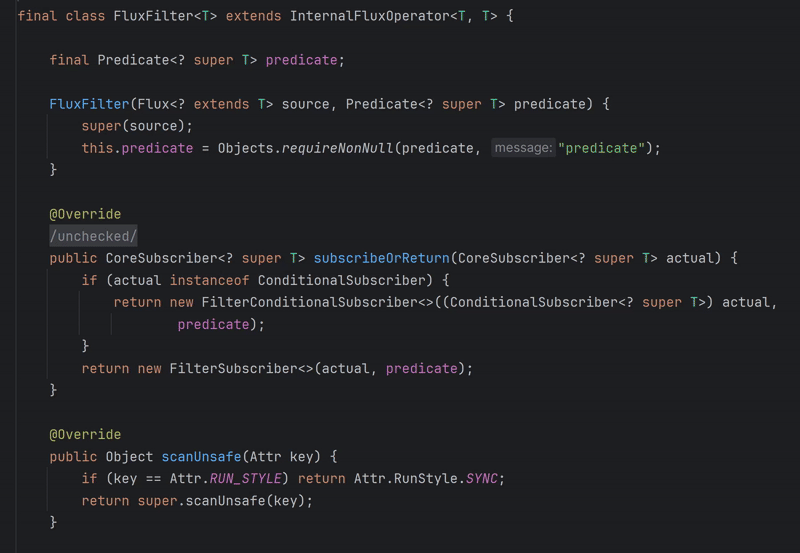
FluxFilter implementation
This is also why defining custom Flow operators is easy and common. For
Mono or Flux I could only see custom operators implemented using other operators, because implementing something custom from scratch is too complex or even impossible.fun <T> Flow<T>.distinct(): Flow<T> = flow { val seen = mutableSetOf<T>() collect { if (seen.add(it)) emit(it) } }
I will argue that Flow has a better designed API. Created by Kotlin Team, was following the same conventions and principles we use and love in Kotlin standard library. That makes it really intuitive.
// Collection processing
val list = (1..100)
    .take(10)
    .filter { it % 2 == 0 }
    .map { it * 2 }
    .onEach { println(it) }

// Flow processing
val flow = (1..100).asFlow()
    .take(10)
    .filter { it % 2 == 0 }
    .map { it * 2 }
    .onEach { println(it) }
Some complain that Flow lacks some operators that we can find in Reactor. It is typically a result of creators precaution. That is not a problem to me, as those operators can typically be found in external libraries, or can be implemented easily. For instance, when I needed backoff retry, I just implemented it myself.
Finally, Flow is based on Kotlin Coroutines, which offers performance benefits, structured concurrency, good cancellation support, context propagation, and many other features that make it efficient and feature-rich. Reactor is based on threads, to have cancellation support it needs to implement its own cancellation mechanism, and it needs user support to make it work. That makes Reactor inherently more complex and less efficient than Flow.
I looked for an advantage of Reactor over Flow in Kotlin, and the only one I could find is that it has much more learning resources, like books, articles, and videos. This is something I am trying to change, by teaching Flow and spreading the word about it. I believe that Coroutines Mastery course will be a good contribution to this effort, as it teaches Flow in a practical way, with many examples and exercises.
I think I can say that Kotlin Coroutines are a better choice than Reactor in Kotlin. In simple cases, they offer intuitive and straightforward suspending functions and
async/await for asynchronous operations. In more complex cases, they provide a powerful and easy-to-use and easy-to-extend Flow API that is based on Kotlin Coroutines, which offers performance benefits, structured concurrency, and good cancellation support.