

People often miss the difference between
Iterable and Sequence. This is understandable since even their definitions are nearly identical:interface Iterable<out T> { operator fun iterator(): Iterator<T> } interface Sequence<out T> { operator fun iterator(): Iterator<T> }
You can say that the only formal difference between them is their names. However,
Iterable and Sequence are associated with totally different usages (have different contracts), so nearly all their processing functions work differently. Sequences are lazy, therefore intermediate functions for Sequence processing don't do any calculations. Instead, they return a new Sequence that decorates the previous one with the new operation. All these computations are evaluated during a terminal operation like toList() or count(). Iterable processing, on the other hand, returns a collection like List at every step.public inline fun <T> Iterable<T>.filter( predicate: (T) -> Boolean ): List<T> { return filterTo(ArrayList<T>(), predicate) } public fun <T> Sequence<T>.filter( predicate: (T) -> Boolean ): Sequence<T> { return FilteringSequence(this, true, predicate) }
As a result, collection processing operations are invoked when they are used.
Sequence processing functions are not invoked until the terminal operation (an operation that returns something different than Sequence). For instance, for Sequence, filter is an intermediate operation, so it doesn’t do any calculations; instead, it decorates the sequence with the new processing step. Calculations are done in a terminal operation like toList or sum.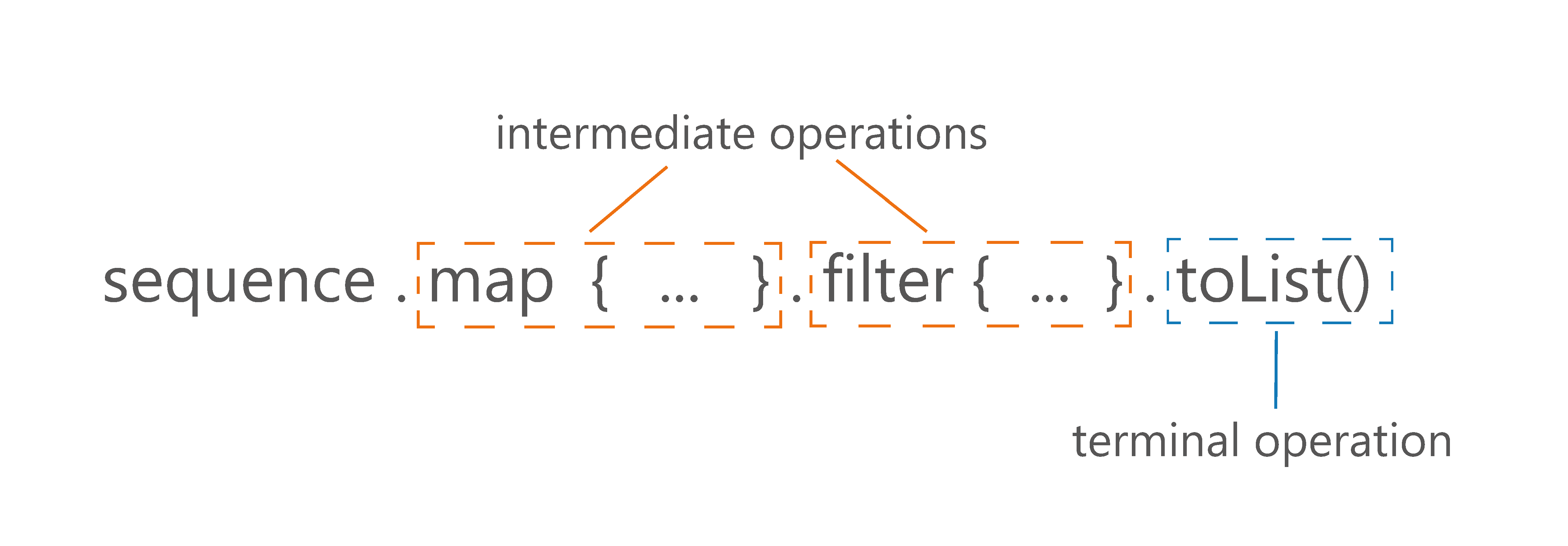
val list = listOf(1, 2, 3)
val listFiltered = list
    .filter { print("f$it "); it % 2 == 1 }
// f1 f2 f3
println(listFiltered) // [1, 3]

val seq = sequenceOf(1, 2, 3)
val filtered = seq.filter { print("f$it "); it % 2 == 1 }
println(filtered)  // FilteringSequence@...

val asList = filtered.toList()
// f1 f2 f3
println(asList) // [1, 3]
There are a few important advantages to the fact that sequences are lazy in Kotlin:
- They keep the natural order of operations.
- They do a minimal number of operations.
- They can be infinite.
- They do not need to create collections at every step.
Let’s talk about these advantages one by one.
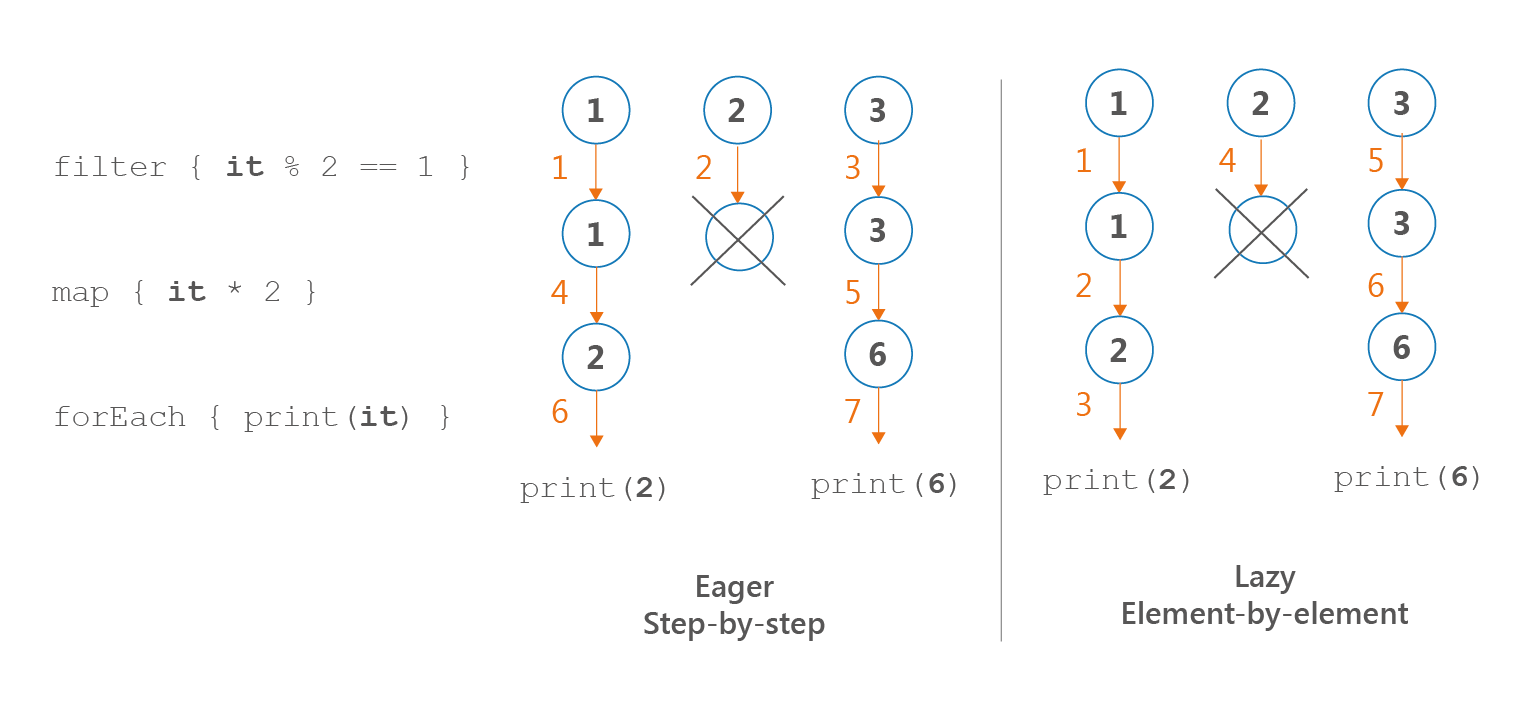
Because of how iterable and sequence processing is implemented, the ordering of their operations is different. In sequence processing, we take the first element and apply all the operations, then we take the next element, and so on. We call this an element-by-element or lazy order. In iterable processing, we take the first operation and apply it to the whole collection, then we move to the next operation, and so on. We call this a step-by-step or eager order.
listOf(1, 2, 3)
    .filter { print("F$it, "); it % 2 == 1 }
    .map { print("M$it, "); it * 2 }
    .forEach { print("E$it, ") }
// Prints: F1, F2, F3, M1, M3, E2, E6,

sequenceOf(1, 2, 3)
    .filter { print("F$it, "); it % 2 == 1 }
    .map { print("M$it, "); it * 2 }
    .forEach { print("E$it, ") }
// Prints: F1, M1, E2, F2, F3, M3, E6,
Notice that if we were to implement these operations without any collection processing functions and we used classic loops and conditions instead, we would have an element-by-element order, like in sequence processing:
for (e in listOf(1, 2, 3)) {
    print("F$e, ")
    if (e % 2 == 1) {
        print("M$e, ")
        val mapped = e * 2
        print("E$mapped, ")
    }
}
// Prints: F1, M1, E2, F2, F3, M3, E6,
Therefore, the element-by-element order that is used in sequence processing is more natural. It also opens the door for low-level compiler optimizations as sequence processing can be optimized to basic loops and conditions. Maybe this will happen one day.
Often we do not need to process a whole collection at every step to produce the result. Let's say that we have a collection with millions of elements and, after processing, we only need to take the first 10. Why process all the other elements? Iterable processing doesn't have the concept of intermediate operations, so a processed collection is returned from every operation. Sequences do not need that, therefore they can do the minimal number of operations required to get the result.

Take a look at the following example, where we have a few processing steps and we end our processing with
find:(1..10) .filter { print("F$it, "); it % 2 == 1 } .map { print("M$it, "); it * 2 } .find { it > 5 } // Prints: F1, F2, F3, F4, F5, F6, F7, F8, F9, F10, // M1, M3, M5, M7, M9, (1..10).asSequence() .filter { print("F$it, "); it % 2 == 1 } .map { print("M$it, "); it * 2 } .find { it > 5 } // Prints: F1, M1, F2, F3, M3,
For this reason, when we have some intermediate processing steps and our terminal operation does not necessarily need to iterate over all elements, using a sequence will most likely be better for your processing performance and it looks nearly the same. Examples of operations that do not necessarily need to process all the elements are
first, find, take, any, all, none, or indexOf.Thanks to the fact that sequences do processing on demand, we can have infinite sequences. A typical way to create an infinite sequence is using sequence generators like
generateSequence or sequence.generateSequence needs the first element and a function specifying how to calculate the next one:generateSequence(1) { it + 1 } .map { it * 2 } .take(10) .forEach { print("$it, ") } // Prints: 2, 4, 6, 8, 10, 12, 14, 16, 18, 20,
sequence uses a suspending function (coroutine[^51_1]) that generates the next number on demand. Whenever we ask for the next number, the sequence builder runs until a value is yielded using yield. The execution then stops until we ask for another number. Here is an infinite list of Fibonacci numbers:import java.math.BigDecimal val fibonacci: Sequence<BigDecimal> = sequence { var current = 1.toBigDecimal() var prev = 1.toBigDecimal() yield(prev) while (true) { yield(current) val temp = prev prev = current current += temp } } fun main() { print(fibonacci.take(10).toList()) // [1, 1, 2, 3, 5, 8, 13, 21, 34, 55] }
Notice that infinite sequences cannot be processed unless we limit their number of elements. We cannot iterate infinitely.
print(fibonacci.toList()) // Runs forever
Therefore, we either need to limit them using an operation like
take, or we need to use a terminal operation that will not need all elements, like first, find or indexOf. Basically, these are also the operations for which sequences are more efficient because they do not need to process all elements.Notice, that
any, all, and none should not be used without being limited first. any can only return true or run forever. Similarly, all and none can only return false.Standard collection processing functions return a new collection at every step. Most often it is a
List. This could be an advantage as we have something ready to be used or stored after every step, but this comes at a cost. Such collections need to be created and filled with data at every step.numbers .filter { it % 10 == 0 } // 1 collection here .map { it * 2 } // 1 collection here .sum() // In total, 2 collections created under the hood numbers .asSequence() .filter { it % 10 == 0 } .map { it * 2 } .sum() // No collections created
This is a problem, especially when we are dealing with big or heavy collections. Let’s start from an extreme yet common case: file reading. Files can weigh gigabytes, therefore allocating all the data in a collection at every processing step could be a huge waste of memory. This is why we use sequences to process files by default.
As an example, let’s analyze crimes in the city of Chicago. This city, like many others, shares the whole database of crimes that have taken place there since 2001 on the internet[^51_3]. Currently, this dataset weighs over 1.53 GB. Let’s say that our task is to find how many crimes had cannabis in their descriptions. This is what a naive solution using collection processing would look like (
readLines returns List<String>):// BAD SOLUTION, DO NOT USE COLLECTIONS FOR // POSSIBLY BIG FILES File("ChicagoCrimes.csv").readLines() .drop(1) // Drop descriptions of the columns .mapNotNull { it.split(",").getOrNull(6) } // Find description .filter { "CANNABIS" in it } .count() .let(::println)
The result on my computer is
OutOfMemoryError.Exception in thread "main" java.lang.OutOfMemoryError: Java heap space
No surprise! We create a collection, then we have 3 intermediate processing steps which add up to 4 collections. 3 of them contain the majority of this data file, which takes 1.53 GB, so in total, they consume more than 4.59 GB. This is a huge waste of memory. The correct implementation should involve a sequence, and we do this using the
useLines function, which always operates on a single line:File("ChicagoCrimes.csv").useLines { lines -> // The type of `lines` is Sequence<String> lines.drop(1) // Drop descriptions of the columns .mapNotNull { it.split(",").getOrNull(6) } // Find description .filter { "CANNABIS" in it } .count() .let { println(it) } // 318185 }
On my computer, this took 8.3s. To compare the efficiency of both methods, I did another experiment: I reduced this dataset size by dropping the columns I didn't need. Thus, I achieved a
CrimeData.csv file with the same crimes but with a size of only 728 MB. Then, I did the same processing. The first implementation, which uses collection processing, took around 13s; the second one, which uses sequences, took around 4.5s. As you can see, using sequences for big files is good not only for memory but also for performance.A significant cost of collection processing is the creation of new collections. This cost is smaller when the size of the new collection is known in advance, like when we use
map, or the cost is bigger when it is not, like when we use filter. Knowing the size of a new list is important because Kotlin generally uses ArrayList as the default list, which needs to copy its internal array when its number of elements is greater than internal capacity (whenever this copy operation is growing, internal capacity grows by half). Sequence processing only creates a collection when it ends with toList, toSet, etc. However, notice that toList on a sequence does not know the size of the new collection in advance.Both creating collections and filling them with data represent a significant part of the cost of processing collections. This is why we should prefer to use Sequences for big collections with more than one processing step.
By "big collections" I mean both many elements and really heavy collections. It might be a list of integers with tens of thousands of elements. It might also be a list with just a few strings, each of which is so long that they all weigh many megabytes in total. These are not common situations, but they sometimes happen.
By one processing step, I mean more than a single function for collection processing. So, if you compare these two functions:
fun singleStepListProcessing(): List<Product> {
    return productsList.filter { it.bought }
}

fun singleStepSequenceProcessing(): List<Product> {
    return productsList.asSequence()
        .filter { it.bought }
        .toList()
}
You will notice that there is nearly no difference in performance (actually, simple list processing is faster because its
filter function is inline). However, when you compare functions with more than one processing step, like the functions below which use filter and then map, the difference will be visible for bigger collections. To see the difference, let's compare typical processing with two and three processing steps for 5,000 products:fun twoStepListProcessing(): List<Double> { return productsList .filter { it.bought } .map { it.price } } fun twoStepSequenceProcessing(): List<Double> { return productsList.asSequence() .filter { it.bought } .map { it.price } .toList() } fun threeStepListProcessing(): Double { return productsList .filter { it.bought } .map { it.price } .average() } fun threeStepSequenceProcessing(): Double { return productsList.asSequence() .filter { it.bought } .map { it.price } .average() }
Below, you can see the average results on a MacBook Pro (Retina, 15-inch, Late 2013)[^51_4] for 5,000 products in the
productsList:twoStepListProcessing 81 095 ns
twoStepSequenceProcessing 55 685 ns
twoStepListProcessingAndAcumulate 83 307 ns
twoStepSequenceProcessingAndAcumulate 6 928 ns
It is hard to predict what performance improvement we can expect. From my observations, in a typical collection processing example with more than one step, we can expect around a 20-40% performance improvement for at least a couple of thousand elements.
There are some operations where we don’t profit from this sequence usage because we have to operate on the whole collection anyway.
sorted is an example from Kotlin stdlib (currently, this is the only example). sorted uses an optimal implementation: it accumulates the Sequence into List and then uses sort from Java stdlib. The disadvantage is that this accumulation process takes longer than the same processing on a Collection (however, if Iterable is not a Collection or array, then the difference is not significant because it also needs to be accumulated).The fact that
Sequence has methods like sorted is controversial because sequences that contain a method that requires all elements to calculate the next one are only partially lazy (evaluated when we need to get the first element) and they don’t work on infinite sequences. It was added because it is a popular function and is much easier to use in this way; however, Kotlin developers should remember its flaws, especially the fact that it cannot be used on infinite sequences.generateSequence(0) { it + 1 }.take(10).sorted().toList() // [0, 1, 2, 3, 4, 5, 6, 7, 8, 9] generateSequence(0) { it + 1 }.sorted().take(10).toList() // Infinite time. Does not return.
sorted is a rare example of a processing step that is faster on Collection than on Sequence. Still, when we do a few processing steps and a single sorted function (or another function that needs to work on the whole collection), we might expect some performance improvement using sequence processing.productsList.asSequence() .filter { it.bought } .map { it.price } .sorted() .take(10) .sum()
Java 8 introduced streams to allow collection processing. They act and look similar to Kotlin sequences.
productsList.asSequence()
    .filter { it.bought }
    .map { it.price }
    .average()

productsList.stream()
    .filter { it.bought }
    .mapToDouble { it.price }
    .average()
    .orElse(0.0)
Java 8 streams are lazy and are collected in the last (terminal) processing step. The three big differences between Java streams and Kotlin sequences are the following:
-
Kotlin sequences have many more processing functions (because they are defined as extension functions), and they are generally easier to use (this is because Kotlin sequences were designed when Java streams were already in use; for instance, we can collect using
toList()instead ofcollect(Collectors.toList())) - Java stream processing can be started in parallel mode using a parallel function. This can give us a huge performance improvement in contexts in which we have a machine with multiple cores that are often unused (which is common nowadays). However, use this with caution as this feature has known pitfalls[^51_2].
- Kotlin sequences can be used in common modules, Kotlin/JVM, Kotlin/JS, and Kotlin/Native modules. Java streams can be only used in Kotlin/JVM, and only when the JVM version is at least 8.
In general, when we don't use parallel mode, it is hard to say if Java stream or Kotlin sequence is more efficient. My suggestion is to use Java streams rarely: only for computationally heavy processing where you can profit from parallel mode. Otherwise, use Kotlin stdlib functions in order to achieve clean, homogeneous code that can be used on different platforms or in common modules.
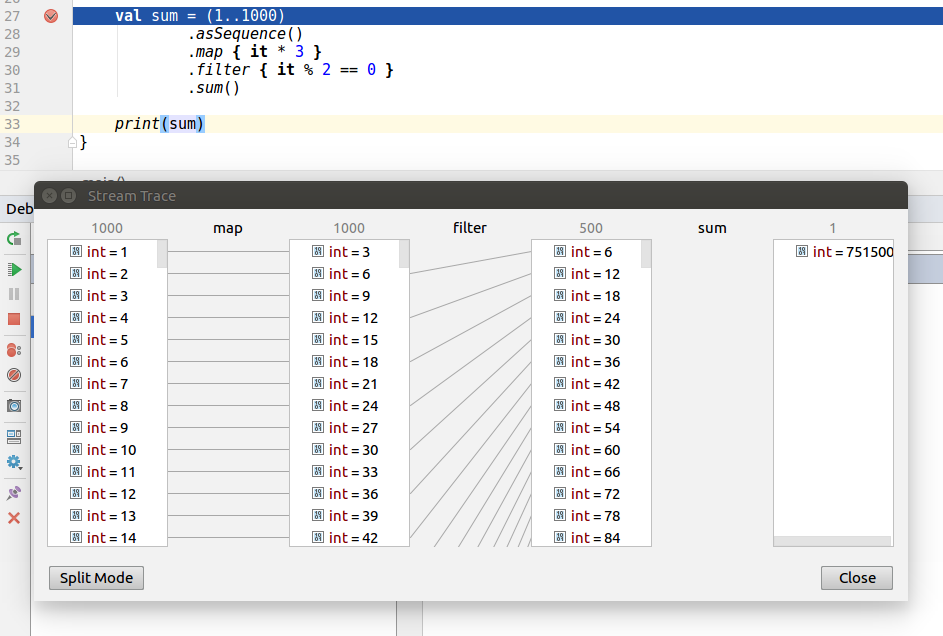
Both Kotlin Sequence and Java Stream have the support that helps us debug how elements are transformed at every step. For Java Stream, this requires a plugin named “Java Stream Debugger”. Kotlin Sequences also used to require a plugin named “Kotlin Sequence Debugger”, though this functionality is now integrated into the Kotlin plugin. Here is a screen showing sequence processing at every step:
Collection and sequence processing are very similar and both support nearly the same processing methods, yet there are important differences between the two. Sequence processing is harder as we generally keep elements in collections, so changing to collections requires a transformation to a sequence and often also back to the desired collection. Sequences are lazy, which brings some important advantages:
- They keep the natural order of operations.
- They do a minimal number of operations.
- They can be infinite.
- They do not need to create collections at every step.
As a result, they are better for processing heavy objects or bigger collections with more than one processing step. Sequences also have their own debugger, which can help us by visualizing how elements are processed. Sequences are not intended to replace classic collection processing. You should use them only when there's a good reason to, and you'll be rewarded with better performance and fewer memory problems.
[^51_1]: These are sequential coroutines, as opposed to parallel/concurrent coroutines. They do not change thread, but they use the capability of suspended functions to stop in the middle of the function and resume whenever needed.
[^51_2]: The problems come from the common join-fork thread pool they use, which means that one process can block another. There’s also a problem with the fact that single element processing can block other elements. Read more about it here: kt.academy/l/java8-streams-problem
[^51_3]: You can find this database at data.cityofchicago.org
[^51_4]: Processor 2.6 GHz Intel Core i7, Memory 16 GB 1600 MHz DDR3
[^51_2]: The problems come from the common join-fork thread pool they use, which means that one process can block another. There’s also a problem with the fact that single element processing can block other elements. Read more about it here: kt.academy/l/java8-streams-problem
[^51_3]: You can find this database at data.cityofchicago.org
[^51_4]: Processor 2.6 GHz Intel Core i7, Memory 16 GB 1600 MHz DDR3


