
This is a chapter from the book Functional Kotlin. You can find it on LeanPub or Amazon. It is also available as a course.
Lambda expressions are a shorter alternative to anonymous functions. They are also used to define objects that represent functions. Both notations compile to the same result, but lambda expressions support more features (most of which will be presented in this chapter). In the end, lambda expressions are the most popular and idiomatic approach to create objects that represent functions, therefore understanding them is essential for using Kotlin’s functional programming features.
An expression used to create an object representing a function is called a function literal, so both lambda expressions and anonymous functions are function literals.
Lambda expressions are defined in braces (curly brackets). What is more, even just empty braces define a lambda expression.
fun main() {
    val f: () -> Unit = {}
    f()
    // or f.invoke()
}
But be careful because all braces that are not part of a Kotlin structure are lambda expressions (we can call them orphaned lambda expressions). This can lead to a lot of problems. Take a look at the following example: What does the following
main function print?fun main() { { println("AAA") } }
The answer is nothing. It creates a lambda expression that is never invoked. Another question: What does the following
produce function return?fun produce() = { 42 } fun main() { println(produce()) // ??? }
Counterintuitively, it is not
42. Braces are not a part of single-expression function notation. The produce function returns a lambda expression of type () -> Int, so the above code on JVM should print something like Function0<java.lang.Integer>, or just () -> Int. To fix this code, we should either call the produced function or remove the braces inside the single-expression function definition.fun produceFun() = { 42 } fun produceNum() = 42 fun main() { val f = produceFun() println(f()) // 42 println(produceFun()()) // 42 println(produceFun().invoke()) // 42 println(produceNum()) // 42 }
If a lambda expression has parameters, we need to separate the content of the braces with an arrow
->. Before the arrow, we specify parameter names and types, separated by commas. After the arrow, we specify the function body.fun main() { val printTimes = { text: String, times: Int -> for (i in 1..times) { print(text) } } // the type is (text: String, times: Int) -> Unit printTimes("Na", 7) // NaNaNaNaNaNaNa printTimes.invoke("Batman", 2) // BatmanBatman }
Most often, we define lambda expressions as arguments to some functions. Regular functions need to define their parameter types, based on which lambda expression parameter types can be inferred.
fun setOnClickListener(listener: (View, Click) -> Unit) {}

fun main() {
    setOnClickListener({ view, click ->
        println("Clicked")
    })
}
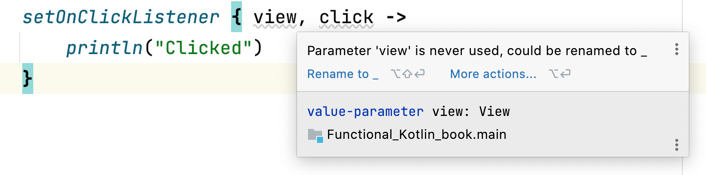
If we want to ignore a parameter, we can use underscore (
_) instead of its name. This is a placeholder that shows that this parameter is ignored.setOnClickListener({ _, _ -> println("Clicked") })
IDEA IntelliJ suggests transforming unused parameters into underscores.
We can also use destructuring when defining a lambda expression’s parameters[^04_1].
data class User(val name: String, val surname: String)
data class Element(val id: Int, val type: String)

fun setOnClickListener(listener: (User, Element) -> Unit) {}

fun main() {
    setOnClickListener({ (name, surname), (id, type) ->
        println(
            "User $name $surname clicked " +
            "element $id of type $type"
        )
    })
}
Kotlin introduced a convention: if we call a function whose last parameter is of a functional type, we can define a lambda expression outside the parentheses. This feature is known as trailing lambda. If it is the only argument we define, we can skip the parameter bracket and just define a lambda expression. Take a look at these examples.
inline fun <R> run(block: () -> R): R = block()

inline fun repeat(times: Int, block: (Int) -> Unit) {
    for (i in 0 until times) {
        block(i)
    }
}

fun main() {
    run({ println("A") }) // A
    run() { println("A") } // A
    run { println("A") } // A

    repeat(2, { print("B") }) // BB
    println()
    repeat(2) { print("B") } // BB
}
In the example above, bothrunandrepeatare simplified functions from the standard library.
This means that we can call our
setOnClickListener in the following way:setOnClickListener { _, _ -> println("Clicked") }
Remember
sum and product from the introduction? We have implemented them using the fold function with a trailing lambda.fun sum(a: Int, b: Int) = (a..b).fold(0) { acc, i -> acc + i } fun product(a: Int, b: Int) = (a..b).fold(1) { acc, i -> acc * i }
But be careful because this convention works only for the last parameter. Take a look at the snippet below and guess what will be printed.
fun call(before: () -> Unit = {}, after: () -> Unit = {}) {
    before()
    print("A")
    after()
}

fun main() {
    call({ print("C") })
    call { print("B") }
}
The answer is "CAAB". Tricky, isn't it? If you call a function with more than one functional parameter, use the named argument convention[^04_2].
fun main() {
    call(before = { print("C") })
    call(after = { print("B") })
}
Lambda expressions were initially designed to implement short functions. Their bodies were designed to be minimalistic; therefore, inside them, instead of using an explicit
return, the result of the last statement is returned. For example, { 42 } returns 42 because this number is the last statement. { 1; 2 } returns 2. { 1; 2; 3 } returns 3.fun main() { val f = { 10 20 30 } println(f()) // 30 }
In most use cases, this is really convenient, but what can we do if we need to finish our function prematurely? A simple
return will not help (for reasons we will cover later).fun main() { onUserChanged { user -> if (user == null) return // compilation error cheerUser(user) } }
To use
return in the middle of a lambda expression, we need to use a label that marks this lambda expression. We specify a label before a lambda expression by using the label name followed by @. Then, we can return from this lambda expression calling return on the defined label.fun main() { onUserChanged someLabel@{ user -> if (user == null) return@someLabel cheerUser(user) } }
To simplify this process, there is a convention: if a lambda expression is used as an argument to a function, the name of this function becomes its default label. So, without specifying a label, we could return from the lambda using the
onUserChanged label in the example above.fun main() { onUserChanged { user -> if (user == null) return@onUserChanged cheerUser(user) } }
This is how we typically return from a lambda expression prematurely. In theory, specifying custom labels might be useful for returning from outer lambda expressions.
fun main() {
    val magicSquare = listOf(
        listOf(2, 7, 6),
        listOf(9, 5, 1),
        listOf(4, 3, 8),
    )
    magicSquare.forEach line@ { line ->
        var sum = 0
        line.forEach { elem ->
            sum += elem
            if (sum == 15) {
                return@line
            }
        }
        print("Line $line not correct")
    }
}
However, in practice, this is not only rare but also considered a poor practice[^04_3], because it violates the usual encapsulation rules. This is similar to throwing an exception from an inner function, but in this case the caller can at least decide to catch and react. However, returning from an outer label completely ignores the intermediate callers.
The previous chapter showed a set of functions implemented with anonymous functions. This is how they might be defined with lambda expressions:
import kotlin.*

fun main() {
    val cheer: () -> Unit = {
        println("Hello")
    }
    cheer.invoke() // Hello
    cheer() // Hello

    val printNumber: (Int) -> Unit = { i: Int ->
        println(i)
    }
    printNumber.invoke(10) // 10
    printNumber(20) // 20

    val log: (String, String) -> Unit =
        { ctx: String, message: String ->
            println("[$ctx] $message")
        }
    log.invoke("UserService", "Name changed")
    // [UserService] Name changed
    log("UserService", "Surname changed")
    // [UserService] Surname changed

    data class User(val id: Int)

    val makeAdmin: () -> User = { User(id = 0) }
    println(makeAdmin()) // User(id=0)

    val add: (String, String) -> String =
        { s1: String, s2: String -> s1 + s2 }
    println(add.invoke("A", "B")) // AB
    println(add("C", "D")) // CD

    data class Name(val name: String)

    val toName: (String) -> Name =
        { name: String -> Name(name) }
    val name: Name = toName("Cookie")
    println(name) // Name(name=Cookie)
}
A lambda expression can specify the types of parameters, so the result type can be inferred:
val cheer = {
    println("Hello")
}
val printNumber = { i: Int ->
    println(i)
}
val log = { ctx: String, message: String ->
    println("[$ctx] $message")
}
val makeAdmin = { User(id = 0) }
val add = { s1: String, s2: String -> s1 + s2 }
val toName = { name: String -> Name(name) }
On the other hand, when parameter types can be inferred, lambda expressions do not need to define them:
val printNumber: (Int) -> Unit = { i ->
    println(i)
}
val log: (String, String) -> Unit = { ctx, message ->
    println("[$ctx] $message")
}
val add: (String, String) -> String = { s1, s2 -> s1 + s2 }
val toName: (String) -> Name = { name -> Name(name) }
When a lambda expression has exactly one parameter, we can reference it using the
it keyword instead of specifying its name. Since the type of it cannot be specified explicitly, it needs to be inferred. Despite this, it is still a very popular feature.val printNumber: (Int) -> Unit = { println(it) } val toName: (String) -> Name = { Name(it) } // Real-life example, functions will be explained later val newsItemAdapters = news .filter { it.visible } .sortedByDescending { it.publishedAt } .map { it.toNewsItemAdapter() }
A lambda expression can use and modify variables from the scope where it is defined.
fun makeCounter(): () -> Int {
    var i = 0
    return { i++ }
}

fun main() {
    val counter1 = makeCounter()
    val counter2 = makeCounter()

    println(counter1()) // 0
    println(counter1()) // 1
    println(counter2()) // 0
    println(counter1()) // 2
    println(counter1()) // 3
    println(counter2()) // 1
}
A lambda expression that refers to an object defined outside its scope, like the lambda expression in the above example that refers to the local variable
i, is called a closure.Let's compare lambda expressions to anonymous functions. They are both function literals, i.e., structures that create an object representing a function. Under the hood, their efficiency is the same. So, when should we choose one over the other? Take a look at the
processor variable below, which is defined using both approaches.val processor = label@{ data: String -> if (data.isEmpty()) { return@label null } data.uppercase() } val processor = fun(data: String): String? { if (data.isEmpty()) { return null } return data.uppercase() }
Lambda expressions are shorter but also less explicit. They return the last expression without an explicit
return keyword. To use return we need to have a label.Anonymous functions are longer, but it is clear that they define a function. They use an explicit
return and must specify the result type.Lambda expressions were mainly designed for single-expression functions, and the documentation suggests using anonymous functions for longer bodies. Although developers used to use lambda expressions practically everywhere, nowadays anonymous functions seem nearly forgotten.
The popularity of lambda expressions is supported by the additional features: trailing lambda, an implicit name for a single parameter, and non-local return (this will be explained later). So, I understand if you decide to forget about anonymous functions and use lambda expressions everywhere. Many developers have already done this.
However, before we close this discussion, we must introduce one more approach for creating objects representing functions. This will be a serious competitor to lambda expressions because it is shorter and has a good-looking, functional style. Let's talk about function references.
[^04_1]: More about destructuring in Kotlin Essentials, Data modifier chapter.
[^04_2]: Best practices regarding naming arguments are explained in Effective Kotlin, Item 17: Consider naming arguments. The named argument convention is explained in Kotlin Essentials, Functions chapter.
[^04_3]: Also, the above algorithm is poorly implemented. It should instead use
[^04_2]: Best practices regarding naming arguments are explained in Effective Kotlin, Item 17: Consider naming arguments. The named argument convention is explained in Kotlin Essentials, Functions chapter.
[^04_3]: Also, the above algorithm is poorly implemented. It should instead use
sumOf function, which we will present later in this book.