
This is a chapter from the book Kotlin Essentials. You can find it on LeanPub or Amazon. It is also available as a course.
In Kotlin, we say that all classes inherit from the
Any superclass, which is at the top of the class hierarchy[^11_3]. Methods defined in Any can be called on all objects. These methods are:equals- used when two objects are compared using==,hashCode- used by collections that use the hash table algorithm,toString- used to represent an object as a string, e.g., in a string template or theprintfunction.
Thanks to these methods, we can represent any object as a string or check the equality of any two objects.
// Any formal definition
open class Any {
   open operator fun equals(other: Any?): Boolean
   open fun hashCode(): Int
   open fun toString(): String
}

class A // Implicitly inherits from Any

fun main() {
   val a = A()
   a.equals(a)
   a == a
   a.hashCode()
   a.toString()
   println(a)
}
Truth be told,Anyis represented as a class, but it should actually be considered the head of the type hierarchy, but with some special functions. Consider the fact thatAnyis also the supertype of all interfaces, even though interfaces cannot inherit from classes.
The default implementations of
equals, hashCode, and toString are strongly based on the object’s address in memory. The equals method returns true only when the address of both objects is the same, which means the same object is on both sides. The hashCode method typically transforms an address into a number. toString produces a string that starts with the class name, then the at sign "@", then the unsigned hexadecimal representation of the hash code of the object.class A fun main() { val a1 = A() val a2 = A() println(a1.equals(a1)) // true println(a1.equals(a2)) // false // or println(a1 == a1) // true println(a1 == a2) // false println(a1.hashCode()) // Example: 149928006 println(a2.hashCode()) // Example: 713338599 println(a1.toString()) // Example: A@8efb846 println(a2.toString()) // Example: A@2a84aee7 // or println(a1) // Example: A@8efb846 println(a2) // Example: A@2a84aee7 }
By overriding these methods, we can decide how a class should behave. Consider the following class
A, which is equal to other instances of the same class and returns a constant hash code and string representation.class A { override fun equals(other: Any?): Boolean = other is A override fun hashCode(): Int = 123 override fun toString(): String = "A()" } fun main() { val a1 = A() val a2 = A() println(a1.equals(a1)) // true println(a1.equals(a2)) // true // or println(a1 == a1) // true println(a1 == a2) // true println(a1.hashCode()) // 123 println(a2.hashCode()) // 123 println(a1.toString()) // A() println(a2.toString()) // A() // or println(a1) // A() println(a2) // A() }
I've dedicated separate items in the Effective Kotlin book to implementing a custom
equals and hashCode[^11_0], but in practice we rarely need to do that. As it turns out, in modern projects we almost solely operate on only two kinds of objects:- Active objects, like services, controllers, repositories, etc. Such classes don’t need to override any methods from
Anybecause the default behavior is perfect for them. - Data model class objects, which represent bundles of data. For such objects, we use the
datamodifier, which overrides thetoString,equals, andhashCodemethods. Thedatamodifier also implements the methodscopyandcomponentN(component1,component2, etc.), which are not inherited and cannot be modified[^11_1].
data class Player(
   val id: Int,
   val name: String,
   val points: Int
)

val player = Player(0, "Gecko", 9999)
Let's discuss the aforementioned implicit data class methods and the differences between regular class behavior and data class behavior.
The default
toString transformation produces a string that starts with the class name, then the at sign "@", and then the unsigned hexadecimal representation of the hash code of the object. The purpose of this is to display the class name and to determine whether two strings represent the same object or not.class FakeUserRepository fun main() { val repository1 = FakeUserRepository() val repository2 = FakeUserRepository() println(repository1) // e.g. FakeUserRepository@8efb846 println(repository1) // e.g. FakeUserRepository@8efb846 println(repository2) // e.g. FakeUserRepository@2a84aee7 }
With the
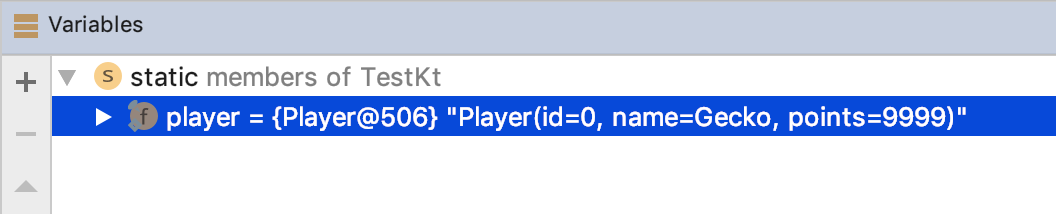
data modifier, the compiler generates a toString that displays the class name and then pairs with the name and value for each primary constructor property. We assume that data classes are represented by their primary constructor properties, so all these properties, together with their values, are displayed during a transformation to a string. This is useful for logging and debugging.data class Player( val id: Int, val name: String, val points: Int ) fun main() { val player = Player(0, "Gecko", 9999) println(player) // Player(id=0, name=Gecko, points=9999) println("Player: $player") // Player: Player(id=0, name=Gecko, points=9999) }
In Kotlin, we check the equality of two objects using
==, which uses the equals method from Any. So, this method decides if two objects should be considered equal or not. By default, two different instances are never equal. This is perfect for active objects, i.e., objects that work independently of other instances of the same class and possibly have a protected mutable state.class FakeUserRepository fun main() { val repository1 = FakeUserRepository() val repository2 = FakeUserRepository() println(repository1 == repository1) // true println(repository1 == repository2) // false }
Classes with the
data modifier represent bundles of data; they are considered equal to other instances if:- both are of the same class,
- their primary constructor property values are equal.
data class Player(
   val id: Int,
   val name: String,
   val points: Int
)

fun main() {
   val player = Player(0, "Gecko", 9999)
   println(player == Player(0, "Gecko", 9999)) // true
   println(player == Player(0, "Ross", 9999)) // false
}
This is what a simplified implementation of the
equals method generated by the data modifier for the Player class looks like:override fun equals(other: Any?): Boolean = other is Player && other.id == this.id && other.name == this.name && other.points == this.points
Implementing a customequalsis described in Effective Kotlin, Item 42: Respect the contract ofequals.
Another method from
Any is hashCode, which is used to transform an object into an Int. With a hashCode method, the object instance can be stored in the hash table data structure implementations that are part of many popular classes, including HashSet and HashMap. The most important rule of the hashCode implementation is that it should:- be consistent with
equals, so it should return the sameIntfor equal objects, and it must always return the same hash code for the same object. - spread objects as uniformly as possible in the range of all possible
Intvalues.
The default
hashCode is based on an object's address in memory. The hashCode generated by the data modifier is based on the hash codes of this object’s primary constructor properties. In both cases, the same number is returned for equal objects.data class Player( val id: Int, val name: String, val points: Int ) fun main() { println(Player(0, "Gecko", 9999).hashCode()) // 2129010918 println(Player(0, "Gecko", 9999).hashCode()) // 2129010918 println(Player(0, "Ross", 9999).hashCode()) // 79159602 }
To learn more about the hash table algorithm and implementing a custom
hashCode method, see Effective Kotlin, Item 43: Respect the contract of hashCode.Another method generated by the
data modifier is copy, which is used to create a new instance of a class but with a concrete modification. The idea is very simple: it is a function with parameters for each primary constructor property, but each of these parameters has a default value, i.e., the current value of the associated property.// This is how copy generated by data modifier // for Person class looks like under the hood fun copy( id: Int = this.id, name: String = this.name, points: Int = this.points ) = Player(id, name, points)
This means we can call
copy with no parameters to make a copy of our object with no modifications, but we can also specify new values for the properties we want to change.data class Player( val id: Int, val name: String, val points: Int ) fun main() { val p = Player(0, "Gecko", 9999) println(p.copy()) // Player(id=0, name=Gecko, points=9999) println(p.copy(id = 1, name = "New name")) // Player(id=1, name=New name, points=9999) println(p.copy(points = p.points + 1)) // Player(id=0, name=Gecko, points=10000) }
Note that
copy creates a shallow copy of an object; so, if our object holds a mutable state, a change in one object will be a change in all its copies too.data class StudentGrades( val studentId: String, // Code smell: Avoid using mutable objects in data classes val grades: MutableList<Int> ) fun main() { val grades1 = StudentGrades("1", mutableListOf()) val grades2 = grades1.copy(studentId = "2") println(grades1) // Grades(studentId=1, grades=[]) println(grades2) // Grades(studentId=2, grades=[]) grades1.grades.add(5) println(grades1) // Grades(studentId=1, grades=[5]) println(grades2) // Grades(studentId=2, grades=[5]) grades2.grades.add(1) println(grades1) // Grades(studentId=1, grades=[5, 1]) println(grades2) // Grades(studentId=2, grades=[5, 1]) }
We do not have this problem when we use
copy for immutable classes, i.e., classes with only val properties that hold immutable values. copy was introduced as special support for immutability (for details, see Effective Kotlin, Item 1: Limit mutability).data class StudentGrades( val studentId: String, val grades: List<Int> ) fun main() { var grades1 = StudentGrades("1", listOf()) var grades2 = grades1.copy(studentId = "2") println(grades1) // Grades(studentId=1, grades=[]) println(grades2) // Grades(studentId=2, grades=[]) grades1 = grades1.copy(grades = grades1.grades + 5) println(grades1) // Grades(studentId=1, grades=[5]) println(grades2) // Grades(studentId=2, grades=[]) grades2 = grades2.copy(grades = grades2.grades + 1) println(grades1) // Grades(studentId=1, grades=[5]) println(grades2) // Grades(studentId=2, grades=[1]) }
Notice that data classes are unsuitable for objects that must maintain invariant constraints on mutable properties. For example, in the
User example below, the class would not be able to guarantee that the name and surname values are not blank if these variables were mutable (so, defined with var). Data classes are perfectly fit for immutable properties, whose constraints might be checked during the creation of these objects. In the example below, we can be sure that the name and surname values are not blank in an instance of User.data class User( val name: String, val surname: String, ) { init { require(name.isNotBlank()) // throws exception if name is blank require(surname.isNotBlank()) // throws exception if surname is blank } }
Kotlin supports a feature called position-based destructuring, which lets us assign multiple variables to components of a single object. For that, we place our variable names in round brackets.
data class Player(
   val id: Int,
   val name: String,
   val points: Int
)

fun main() {
   val player = Player(0, "Gecko", 9999)
   val (id, name, pts) = player
   println(id) // 0
   println(name) // Gecko
   println(pts) // 9999
}
This mechanism relies on position, not names. The object on the right side of the equality sign needs to provide the functions
component1, component2, etc., and the variables are assigned to the results of these methods.val (id, name, pts) = player // is compiled to val id: Int = player.component1() val name: String = player.component2() val pts: Int = player.component3()
This code works because the
data modifier generates componentN functions for each primary constructor parameter, according to their order in the constructor.These are currently all the functionalities that the
data modifier provides. Don't use it if you don't need toString, equals, hashCode, copy or destructuring. If you need some of these functionalities for a class representing a bundle of data, use the data modifier instead of implementing the methods yourself.Position-based destructuring has pros and cons. Its biggest advantage is that we can name variables however we want, so we can use names like
country and city in the example below. We can also destructure anything we want as long as it provides componentN functions. This includes List and Map.Entry, both of which have componentN functions defined as extensions:fun main() { val visited = listOf("Spain", "Morocco", "India") val (first, second, third) = visited println("$first $second $third") // Spain Morocco India val trip = mapOf( "Spain" to "Gran Canaria", "Morocco" to "Taghazout", "India" to "Rishikesh" ) for ((country, city) in trip) { println("We loved $city in $country") // We loved Gran Canaria in Spain // We loved Taghazout in Morocco // We loved Rishikesh in India } }
On the other hand, position-based destructuring is dangerous. We need to adjust every destructuring when the order or number of elements in a data class changes. When we use this feature, it is very easy to introduce errors into our code by changing the order of the primary constructor’s properties.
data class FullName(
   val firstName: String,
   val secondName: String,
   val lastName: String
)

val elon = FullName("Elon", "Reeve", "Musk")
val (name, surname) = elon
print("It is $name $surname!") // It is Elon Reeve!
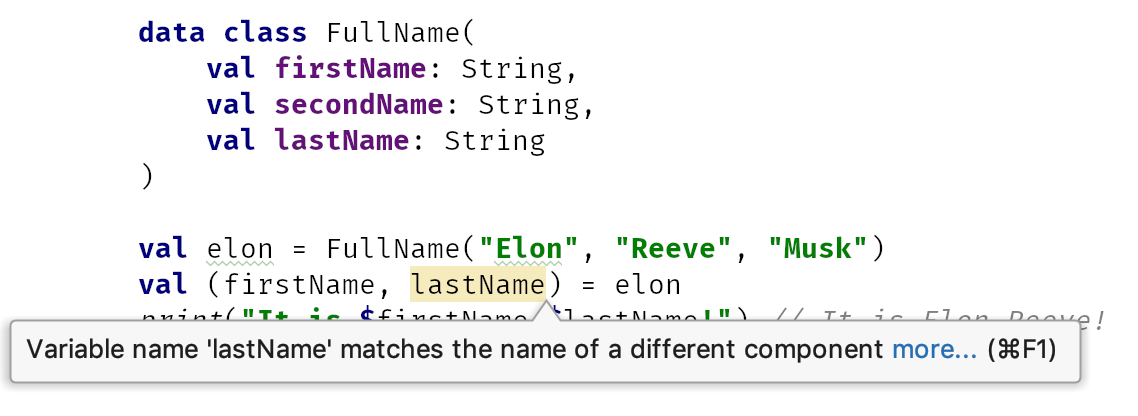
We need to be careful with destructuring. It is useful to use the same names as data class primary constructor properties. In the case of an incorrect order, an IntelliJ/Android Studio warning will be shown. It might even be useful to upgrade this warning to an error.
Destructuring a single value in lambda is very confusing, especially since parentheses around arguments in lambda expressions are either optional or required in some languages.
data class User(
   val name: String,
   val surname: String,
)

fun main() {
   val users = listOf(
       User("Nicola", "Corti")
   )
   users.forEach { u -> println(u) }
   // User(name=Nicola, surname=Corti)
   users.forEach { (u) -> println(u) }
   // Nicola
}
The idea behind data classes is that they represent a bundle of data; their constructors allow us to specify all this data, and we can access it through destructuring or by copying them to another instance with the
copy method. This is why only primary constructor properties are considered by the methods defined in data classes.data class Dog( val name: String, ) { // Bad practice, avoid mutable properties in data classes var trained = false } fun main() { val d1 = Dog("Cookie") d1.trained = true println(d1) // Dog(name=Cookie) // so nothing about trained property val d2 = d1.copy() println(d1.trained) // true println(d2.trained) // false // so trained value not copied }
Data classes are supposed to keep all the essential properties in their primary constructor. Inside the body, we should only keep redundant immutable properties, which means properties whose value is distinctly calculated from primary constructor properties, like
fullName, which is calculated from name and surname. Such values are also ignored by data class methods, but their value will always be correct because it will be calculated when a new object is created.data class FullName( val name: String, val surname: String, ) { val fullName = "$name $surname" } fun main() { val d1 = FullName("Cookie", "Moskała") println(d1.fullName) // Cookie Moskała println(d1) // FullName(name=Cookie, surname=Moskała) val d2 = d1.copy() println(d2.fullName) // Cookie Moskała println(d2) // FullName(name=Cookie, surname=Moskała) }
You should also remember that data classes must be final and so cannot be used as a super-type for inheritance.
Data classes offer more than what is generally provided by tuples. Historically, they replaced tuples in Kotlin since they are considered better practice[^11_2]. The only tuples that are left are
Pair and Triple, but these are data classes under the hood:data class Pair<out A, out B>( val first: A, val second: B ) : Serializable { override fun toString(): String = "($first, $second)" } data class Triple<out A, out B, out C>( val first: A, val second: B, val third: C ) : Serializable { override fun toString(): String = "($first, $second, $third)" }
The easiest way to create a
Pair is by using the to function. This is a generic infix extension function, defined as follows (we will discuss both generic and extension functions in later chapters).infix fun <A, B> A.to(that: B): Pair<A, B> = Pair(this, that)
Thanks to the infix modifier, a method can be used by placing its name between arguments, as the infix name suggests. The result
Pair is typed, so the result type from the "ABC" to 123 expression is Pair<String, Int>.fun main() { val p1: Pair<String, Int> = "ABC" to 123 println(p1) // (ABC, 123) val p2 = 'A' to 3.14 // the type of p2 is Pair<Char, Double> println(p2) // (A, 123) val p3 = true to false // the type of p3 is Pair<Boolean, Boolean> println(p3) // (true, false) }
These tuples remain because they are very useful for local purposes, like:
- When we immediately name values:
val (description, color) = when {
   degrees < 5 -> "cold" to Color.BLUE
   degrees < 23 -> "mild" to Color.YELLOW
   else -> "hot" to Color.RED
}
- To represent an aggregate that is not known in advance, as is commonly the case in standard library functions:
val (odd, even) = numbers.partition { it % 2 == 1 }
val map = mapOf(1 to "San Francisco", 2 to "Amsterdam")
In other cases, we prefer data classes. Take a look at an example: let’s say that we need a function that parses a full name into a name and a surname. One might represent this name and surname as a
Pair<String, String>:fun String.parseName(): Pair<String, String>? { val indexOfLastSpace = this.trim().lastIndexOf(' ') if (indexOfLastSpace < 0) return null val firstName = this.take(indexOfLastSpace) val lastName = this.drop(indexOfLastSpace) return Pair(firstName, lastName) } // Usage fun main() { val fullName = "Marcin Moskała" val (firstName, lastName) = fullName.parseName() ?: return }
The problem is that when someone reads this code, it is not clear that
Pair<String, String> represents a full name. What is more, it is not clear what the order of the values is, therefore someone might think that the surname goes first:val fullName = "Marcin Moskała" val (lastName, firstName) = fullName.parseName() ?: return print("His name is $firstName") // His name is Moskała
To make usage safer and the function easier to read, we should use a data class instead:
data class FullName(
   val firstName: String,
   val lastName: String
)

fun String.parseName(): FullName? {
   val indexOfLastSpace = this.trim().lastIndexOf(' ')
   if (indexOfLastSpace < 0) return null
   val firstName = this.take(indexOfLastSpace)
   val lastName = this.drop(indexOfLastSpace)
   return FullName(firstName, lastName)
}

// Usage
fun main() {
  val fullName = "Marcin Moskała"
  val (firstName, lastName) = fullName.parseName() ?: return
  print("His name is $firstName $lastName")
  // His name is Marcin Moskała
}
This costs nearly nothing and improves the function significantly:
- The return type of this function is more clear.
- The return type is shorter and easier to pass forward.
- If a user destructures variables with correct names but in incorrect positions, a warning will be displayed in IntelliJ.
If you don’t want this class in a wider scope, you can restrict its visibility. It can even be private if you only need to use it for some local processing in a single file or class. It is worth using data classes instead of tuples. Classes are cheap in Kotlin, so don’t be afraid to use them in your projects.
In this chapter, we've learned about
Any, which is a superclass of all classes. We’ve also learned about methods defined by Any: equals, hashCode, and toString. We’ve also learned that there are two primary types of objects. Regular objects are considered unique and do not expose their details. Data class objects, which we made using the data modifier, represent bundles of data (we keep them in primary constructor properties). They are equal when they hold the same data. When transformed to a string, they print all their data. They additionally support destructuring and making a copy with the copy method. Two generic data classes in Kotlin stdlib are Pair and Triple, but (apart from certain cases) we prefer to use custom data classes instead of these. Also, for the sake of safety, when we destructure a data class, we prefer to match the variable names with the parameter names.Now, let's move on to a topic dedicated to special Kotlin syntax that lets us create objects without defining a class.
[^11_0]: These are Item 42: Respect the contract of
[^11_1]: This type of class is so popular that in Java it is common practice to auto-generate
[^11_2]: Kotlin had support for tuples when it was still in the beta version. We were able to define a tuple by brackets and a set of types, like
[^11_3]: So
equals and Item 43: Respect the contract of hashCode.[^11_1]: This type of class is so popular that in Java it is common practice to auto-generate
equals, hashCode, and toString in IntelliJ or using the Lombok library.[^11_2]: Kotlin had support for tuples when it was still in the beta version. We were able to define a tuple by brackets and a set of types, like
(Int, String, String, Long). What we achieved behaved the same as data classes in the end, but it was far less readable. Can you guess what type this set of types represents? It can be anything. Using tuples is tempting, but using data classes is nearly always better. This is why tuples were removed, and only Pair and Triple are left.[^11_3]: So
Any is an analog to Object in Java, JavaScript or C#. There is no direct analog in C++.