

This article was originally published on the JetBrains blog.
When it comes to writing short scripts or CRUDs, Python is a great choice. With its rich ecosystem and broad adoption, it can be easily used to scrape some data or to perform data analysis. However, maintaining a large codebase in Python can be very problematic.
Its untyped and mutable nature generates safety problems. Event-loop-based coroutines can cause serious problems. Finally, the single-threaded and dynamically typed nature of this language makes Python code significantly less efficient than most of its modern competitors.
Those are the key reasons we can hear from companies or teams that decide to switch from Python to Kotlin. In recent months, we have observed a significant increase in such companies (see Wolt success story). A trend is forming.
Kotlin is a very reasonable choice. It is very similar to Python. At the same time, Kotlin offers better performance, safety, and a much more powerful concurrency model.
Teaching Kotlin to both Python and Java developers, I was often surprised to discover that many Kotlin features are much more intuitive for Python developers. Both languages offer concise syntax. Let's compare very simple use cases in both languages:
val language = "Kotlin"
println("Hello from $language")
// prints "Hello from Kotlin"

val list = listOf(1, 2, 3, 4, 5)
for (item in list) {
  println(item)
}
// prints 1 2 3 4 5 each in a new line

fun greet(name: String = "Guest") {
  println("Hello, $name!")
}
greet() // prints "Hello, Guest!"
language = "Python"
print(f"Hello from {language}")
# prints "Hello from Python"

list = [1, 2, 3, 4, 5]
for item in list:
  print(item)
# prints 1 2 3 4 5 each in a new line

def greet(name="Guest"):
  print(f"Hello, {name}!")
greet()  # prints "Hello, Guest!"
At first glance, there are only small syntactic differences. Kotlin presents features well-known to Python developers, like string interpolation, concise loops, and default parameters. However, even in this simple example, we can see some advantages of Kotlin. All properties are statistically typed, so
language is of type String, and list is of type List<Int>. That allows not only low-level optimizations, but also safety and better IDE support. Those variables are also defined as immutable, so we cannot accidentally change their values. To change them, we would need to use var instead of val. The same for the list I used in this snippet - it is immutable, so we cannot accidentally change its content. To create a mutable list, we would need to use mutableListOf and type it as MutableList<Int>. This strong distinction between mutable and immutable types is a great way to avoid accidental changes, which are often the source of bugs in Python programs.There are other advantages of Kotlin over Python related to the above example. Python's default arguments are static, so changing them influences all future calls. This is a well-known source of very sneaky bugs in Python programs. Kotlin's default arguments are evaluated at each call, so they are safer.
fun test(list: MutableList<Int> = mutableListOf()) {
  list.add(1)
  println(list)
}
test() // prints [1]
test() // prints [1]
test() // prints [1]
def test(list=[]):
  list.append(1)
  print(list)

test()  # prints [1]
test()  # prints [1, 1]
test()  # prints [1, 1, 1]
Let's talk about classes. Both languages support classes, inheritance, and interfaces. To compare them, let's look at a simple data class in both languages:
data class Post(
  val id: Int,
  val content: String,
  val publicationDate: LocalDate,
  val author: String? = null
)
val post = Post(1, "Hello, Kotlin!", LocalDate.of(2024, 6, 1))
println(post) // prints Post(id=1, content=Hello, Kotlin!, publicationDate=2024-06-01, author=null)
@dataclass
class Post:
  id: int
  content: str
  publication_date: date
  author: Optional[str] = None

post = Post(1, "Hello, Python!", datetime.date(2024, 6, 1))
print(post)  # prints Post(id=1, content='Hello, Python!', publication_date=datetime.date(2024, 6, 1), author=null)
Kotlin has built-in support for data classes, which automatically allows such objects to be compared by value, destructured, and copied. Python requires an additional decorator to achieve similar functionality. This class is truly immutable in Kotlin, and thanks to static typing, it requires minimal memory. Outside of that, both implementations are very similar. Kotlin has built-in support for nullability, which in Python is expressed with the
Optional type from the typing package.Now, let's define a repository interface and its implementation in both languages. In Kotlin, we can use Spring Data with coroutine support, while in Python, we can use SQLAlchemy with async support. Notice that in Kotlin there are two kinds of properties: those defined inside a bracket are constructor parameters, while those defined within braces are class properties. So in
SqlitePostRepository, crud is expected to be passed in the constructor. The framework we use will take care of providing an instance of PostCrudRepository, that is generated automatically by Spring Data.interface PostRepository { suspend fun getPost(id: Int): Post? suspend fun getPosts(): List<Post> suspend fun savePost(content: String, author: String): Post } @Service class SqlitePostRepository( private val crud: PostCrudRepository ) : PostRepository { override suspend fun getPost(id: Int): Post? = crud.findById(id) override suspend fun getPosts(): List<Post> = crud.findAll().toList() override suspend fun savePost(content: String, author: String): Post = crud.save(Post(content = content, author = author)) } @Repository interface PostCrudRepository : CoroutineCrudRepository<Post, Int> @Entity data class Post( @Id @GeneratedValue val id: Int? = null, val content: String, val publicationDate: LocalDate = LocalDate.now(), val author: String )
class PostRepository(ABC):
  @abstractmethod
  async def get_post(self, post_id: int) -> Optional[Post]:
      pass

  @abstractmethod
  async def get_posts(self) -> List[Post]:
      pass

  @abstractmethod
  async def save_post(self, content: str, author: str) -> Post:
      pass

class SqlitePostRepository(PostRepository):
  def __init__(self, session: AsyncSession):
      self.session = session

  async def get_post(self, post_id: int) -> Optional[Post]:
      return await self.session.get(Post, post_id)

  async def get_posts(self) -> List[Post]:
      result = await self.session.execute(select(Post))
      return result.scalars().all()

  async def save_post(self, content: str, author: str) -> Post:
      post = Post(content=content, author=author)
      self.session.add(post)
      await self.session.commit()
      await self.session.refresh(post)
      return post

class Post(Base):
  __tablename__ = "posts"
  id: Mapped[int] = Column(Integer, primary_key=True, index=True)
  content: Mapped[str] = Column(String)
  publication_date: Mapped[date] = Column(Date, default=date.today)
  author: Mapped[str] = Column(String)
Those implementations are very similar in many ways, and key differences are a result of choices made by the frameworks, not by languages themselves. Python, by its dynamic nature, encourages using untyped objects or dictionaries, but in modern days, such practices are generally discouraged. Both languages give plenty of tools for libraries to design good APIs. On JVM those languages often depend on annotation processing, while in Python, decorators are more common. Kotlin uses a mature and well-developed Spring Boot ecosystem, but it also has lightweight alternatives like Ktor or Micronaut. Python has Flask and FastAPI as popular lightweight frameworks, and Django as a more heavyweight framework.
In a backend application, we also need to implement services, which are classes that implement business logic. They often do some collection or string processing. Kotlin offers a very rich standard library with many useful functions for processing collections and strings. All those functions are named and called in a very consistent way. In Python, we can make nearly all transformations available in Kotlin, but to do so, we need to use many different kinds of constructs. In the code below, I needed to use top-level functions, methods on lists, collection comprehensions, or even classes from the
collections package. Those constructs are not very consistent, some of them are not very convenient, and not easily discoverable. You can also see that complicated notation for defining lambda expressions in Python harms collection processing APIs. Collection and string processing in Kotlin is much more pleasant and productive.class PostService( private val repository: PostRepository ) { suspend fun getPostsByAuthor(author: String): List<Post> = repository.getPosts() .filter { it.author == author } .sortedByDescending { it.publicationDate } suspend fun getAuthorsWithPostCount(): Map<String?, Int> = repository.getPosts() .groupingBy { it.author } .eachCount() suspend fun getAuthorsReport(): String = getAuthorsWithPostCount() .toList() .sortedByDescending { (_, count) -> count } .joinToString(separator = "\n") { (author, count) -> val author = author ?: "Unknown" "$author: $count posts" } .let { "Authors Report:\n$it" } }
class PostService:
  def __init__(self, repository: "PostRepository") -> None:
      self.repository = repository

  async def get_posts_by_author(self, author: str) -> List[Post]:
      posts = await self.repository.get_posts()
      filtered = [post for post in posts if post.author == author]
      sorted_posts = sorted(
          filtered,
          key=lambda p: p.publication_date,
          reverse=True
      )
      return sorted_posts

  async def get_authors_with_post_count(self) -> Dict[Optional[str], int]:
      posts = await self.repository.get_posts()
      counts = Counter(p.author for p in posts)
      return dict(counts)

  async def get_authors_report(self) -> str:
      counts = await self.get_authors_with_post_count()
      items = sorted(counts.items(), key=lambda kv: kv[1], reverse=True)
      lines = [
          f"{(author if author is not None else 'Unknown')}: {count} posts"
          for author, count in items
      ]
      return "Authors Report:\n" + "\n".join(lines)
Before we finish our comparison, let’s complete our example backend application by defining a controller that exposes our service through HTTP. Until now I based on Spring Boot, which is the most popular framework for Kotlin backend development. This is how it can be used to define a controller:
@Controller
@RequestMapping("/posts")
class PostController(
   private val service: PostService
) {
   @GetMapping("/{id}")
   suspend fun getPost(@PathVariable id: Int): ResponseEntity<Post> {
       val post = service.getPost(id)
       return if (post != null) {
           ResponseEntity.ok(post)
       } else {
           ResponseEntity.notFound().build()
       }
   }

   @GetMapping
   suspend fun getPostsByAuthor(@RequestParam author: String): List<Post> =
       service.getPostsByAuthor(author)

   @GetMapping("/authors/report")
   suspend fun getAuthorsReport(): String =
       service.getAuthorsReport()
}
However, we noticed that many Python developers prefer a lighter and simpler framework, and their popular choice is Ktor Server. It allows defining a working application in just a couple of lines of code. This is a complete Ktor Server application that implements a simple in-memory text storage (it requires no other configuration or dependencies except Ktor Server itself):
fun main(): Unit = embeddedServer(Netty, port = 8080) {
   routing {
       var value = ""
       get("/text") {
           call.respondText(value)
       }
       post("/text") {
           value = call.receiveText()
           call.respond(HttpStatusCode.OK)
       }
   }
}.start(wait = true)
I hope that this comparison helped you see both key similarities and differences between Python and Kotlin. Kotlin has many features that are very intuitive for Python developers. At the same time, Kotlin offers many improvements over Python, especially in terms of safety. It has a powerful static type system that prevents many common bugs, built-in support for immutability, and a very rich and consistent standard library.
So we discussed some similarities. I believe they can be summarized with the constatation that both languages are very similar in many ways, but Kotlin introduced some smaller or bigger improvements. Except of them, Kotlin offers some unique features that are not present in Python. The biggest one is a concurrency model based on coroutines.
The most modern approach to concurrency in Kotlin and in Python is based on coroutines. In Python the most popular library for that is
asyncio, while in Kotlin has Kotlin Coroutines library, made by Kotlin creators. Both libraries can start lightweight asynchronous tasks and await their completion. However, there are some important differences between them.Let's start from the trademark of Kotlin Coroutines: first-class support for structured concurrency. Let's say that you implement a service like SkyScanner, that searches for the best flight offers. Now let's say that user made a search, which made a request or opened a websocket connection to our service. Our service needs to query multiple airlines to return the best offers. Now let's say that this user left our page soon after making the search. All those requests to airlines are now useless, and they are likely very costly, because we have a limited number of ports we can use to make requests. However, implementing explicit cancellation of all those requests is very hard. Structured concurrency solves that problem. In Kotlin Coroutines, every coroutine started by a coroutine is its child, and when the parent coroutine is cancelled, all its children are cancelled too. This way, our cancellation is automatic and reliable.

However, structured concurrency goes even further. If getting a resource requires loading two other resources asynchronously, an exception in one of those two resources will cancel the other one too. This way, Kotlin Coroutines ensure that we use our resources in the most efficient way. In Python,
asyncio introduced TaskGroup in version 3.11, which offers some support for structured concurrency, but it is far from what Kotlin Coroutines offer, and requires explicit usage.suspend fun fetchUser(): UserData = coroutineScope { // fetchUserDetails is cancelled if fetchPosts fails val userDetails = async { api.fetchUserDetails() } // fetchPosts is cancelled if fetchUserDetails fails val posts = async { api.fetchPosts() } UserData(userDetails.await(), posts.await()) }
The second important difference is thread management. In Python,
asyncio runs all tasks on a single thread. Notice that this is not utilizing the power of multiple CPU cores, and it is not suitable for CPU-intensive tasks. In Kotlin Coroutines, coroutines can typically run on a thread pool (by default as big as the number of CPU cores). This way Kotlin Coroutines beter utilize the power of modern hardware. Of course, Kotlin Coroutines can also run on a single thread if needed, which is quite common in client applications.Another big advantage of Kotlin Coroutines is its testing capabilities. Kotlin Coroutines provide built-in support for testing asynchronous code on a virtual time. This way we can test asynchronous code in a deterministic way, without any flakiness. We can also easily simulate all kinds of scenarios, like different delays from dependent services. In Python, testing asynchronous code is possible using third-party libraries, but it is not as powerful and convenient as in Kotlin Coroutines.
@Test
fun `should fetch data asynchronously`() = runTest {
  val api = mockk<Api> {
      coEvery { fetchUserDetails() } coAnswers {
          delay(1000)
          UserDetails("John Doe")
      }
      coEvery { fetchPosts() } coAnswers {
          delay(1000)
          listOf(Post("Hello, world!"))
      }
  }
  val useCase = FetchUserDataUseCase(api)
  val userData = useCase.fetchUser()
  assertEquals("John Doe", userData.user.name)
  assertEquals("Hello, world!", userData.posts.single().title)
  assertEquals(1000, currentTime)
}
Finally, Kotlin Coroutines offer a powerful support for reactive streams through
Flow. It is perfect for representing websockets or streams of events. Flow processing can be easily transformed using operators consistent with collection processing. It also supports backpressure, which is essential for building robust systems. Python has async generators, which can be used to represent streams of data, but they are not as powerful and convenient as Flow.fun notificationStatusFlow(): Flow<NotificationStatus> = notificationProvider.observeNotificationUpdate() .distinctUntilChanged() .scan(NotificationStatus()) { status, update -> status.applyNotification(update) } .combine( userStateProvider.userStateFlow() ) { status, user -> statusFactory.produce(status, user) }
One of the key benefits of switching from Python to Kotlin is performance. Python applications can be fast when they use optimized native libraries, but Python itself is not the fastest language. As a statically typed language, Kotlin can be compiled to optimized bytecode that runs on the JVM platform, which is a highly optimized runtime. In consequence, Kotlin applications are typically faster than Python applications.
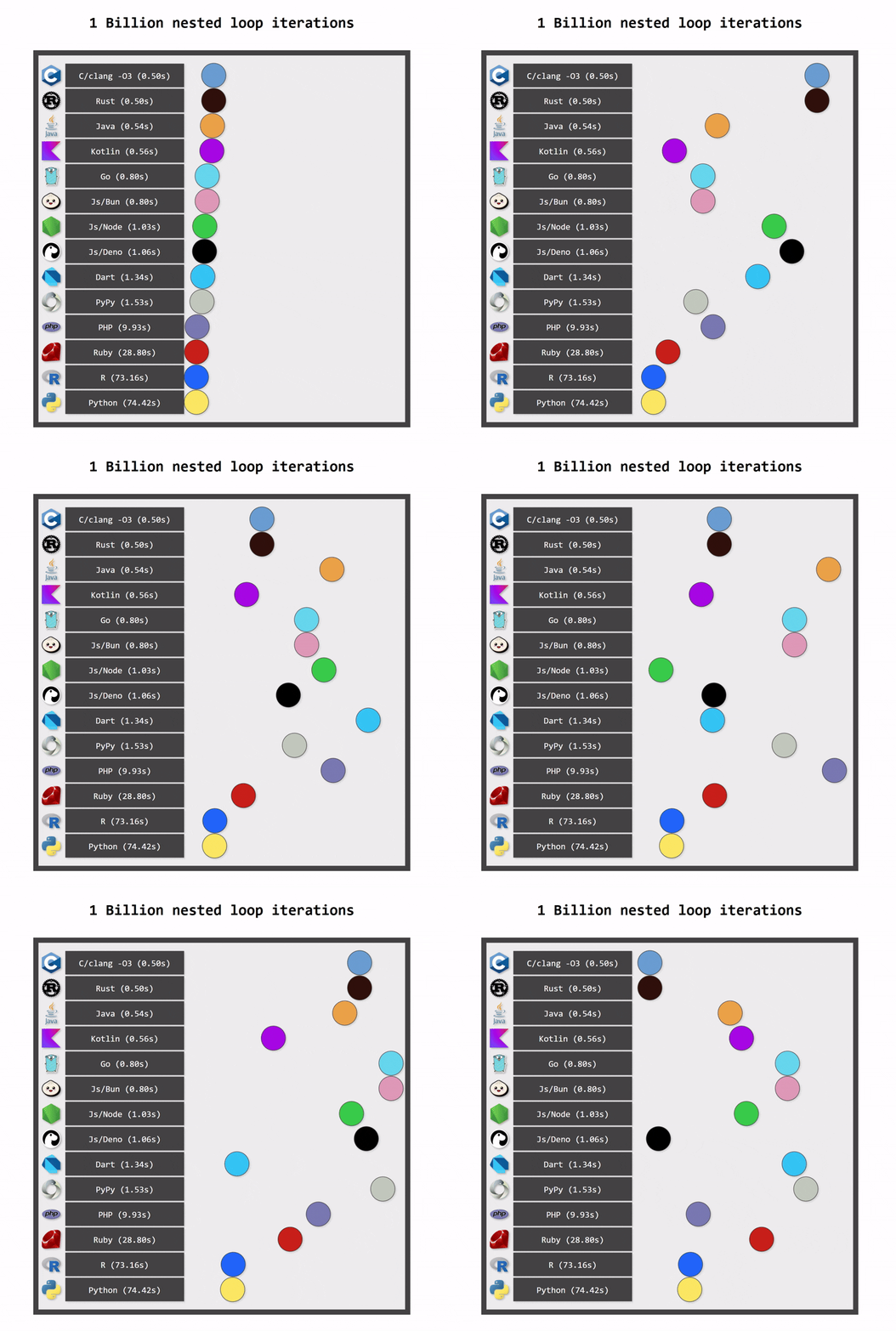
Benchmark comparing different languages performing the same nested loop iterations made by Ben Dicken and published on https://benjdd.com/languages/.
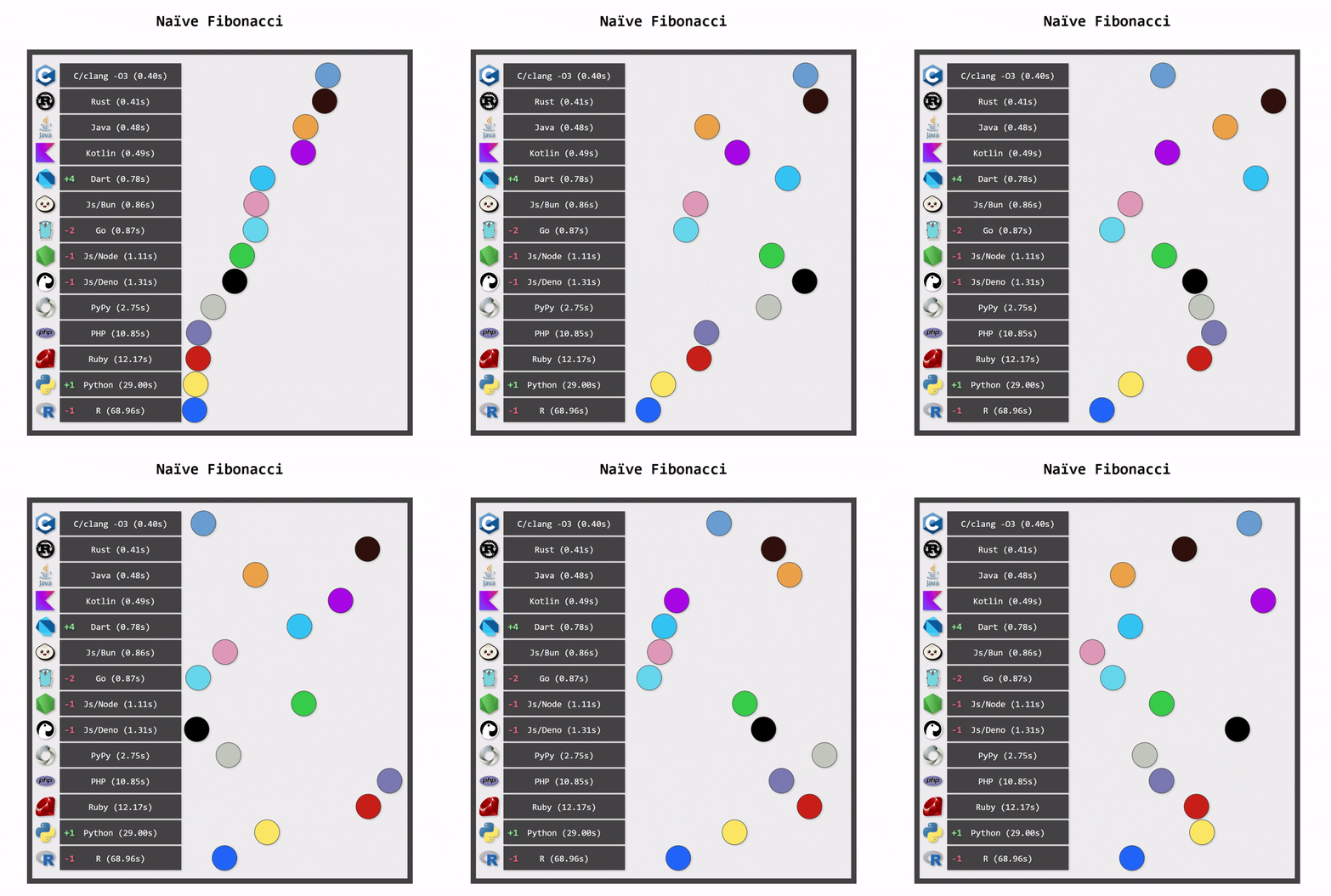
Benchmark comparing different languages performing the same Naive Fibonacci calculation made by Ben Dicken and published on https://benjdd.com/languages/.
Kotlin applications also use less memory and ports than Python applications. One reason is more efficient memory management (again, a consequence of static typing). Another reason is structured concurrency, that ensures that resources are used in the most efficient way.
Kotlin is fully interoperable with Java. This means that Kotlin applications can use everything from the rich Java ecosystem. It is also possible to bridge between Kotlin and Python using libraries like JPype or Py4J. Nowadays, there are also libraries support further interoperability, like zodable, which allows generating Zod schemas from Kotlin data classes.
I love Kotlin and I love Python. I used both languages in my career. In the past, Python had many clear advantages over Kotlin, like richer ecosystem, more libraries, and scripting capabilities. In some domains, like artificial intelligence, I still find Python to be a better choice. However, for backend development, Kotlin is clearly a better choice today. It offers similar conciseness and ease of use as Python, but it is faster, safer, and scales better. If you consider switching from Python to Kotlin for your backend development, it is a transition worth making.
