

The Kotlin Coroutines library offers an important functionality that lets us decide which thread (or pool of threads) a coroutine should be running on (starting and resuming). This is done using dispatchers.
In the English dictionary, a dispatcher is defined as "a person who is responsible for sending people or vehicles to where they are needed, especially emergency vehicles". In Kotlin coroutines,
CoroutineContext determines which thread a certain coroutine will run on.Dispatchers in Kotlin Coroutines are a similar concept to RxJava Schedulers.
If you don't set any dispatcher, the one chosen by default by asynchronous coroutine builders is
Dispatchers.Default, which is designed to run CPU-intensive operations. It has a pool of threads whose size is equal to the number of cores in the machine your code is running on (but not less than two). At least theoretically, this is the optimal number of threads, assuming you are using them efficiently, i.e., performing CPU-intensive calculations and not blocking threads. To see this dispatcher in action, run the following code:import kotlinx.coroutines.coroutineScope import kotlinx.coroutines.launch import kotlin.random.Random //sampleStart suspend fun main(): Unit = coroutineScope { repeat(1000) { launch { // or launch(Dispatchers.Default) { // To make it busy List(1_000_000) { Random.nextLong() }.maxOrNull() val threadName = Thread.currentThread().name println("Running on thread: $threadName") } } } //sampleEnd
Example result on my machine (I have 12 cores, so there are 12 threads in the pool):
Running on thread: DefaultDispatcher-worker-1
Running on thread: DefaultDispatcher-worker-5
Running on thread: DefaultDispatcher-worker-7
Running on thread: DefaultDispatcher-worker-6
Running on thread: DefaultDispatcher-worker-11
Running on thread: DefaultDispatcher-worker-2
Running on thread: DefaultDispatcher-worker-10
Running on thread: DefaultDispatcher-worker-4
...
Warning:runBlockingsets its own dispatcher if no other one is set; so, inside its scope theDispatcher.Defaultis not the one that is chosen automatically. If we usedrunBlockinginstead ofcoroutineScopein the above example, all coroutines would be running on "main".
Let's say that you have an expensive process and you suspect that it might use all
Dispatchers.Default threads and starve other coroutines using the same dispatcher. In such cases, we can use limitedParallelism on Dispatchers.Default to make a dispatcher that runs on the same threads but is limited to using not more than a certain number of them at the same time.private val dispatcher = Dispatchers.Default .limitedParallelism(5)
If you've seen
limitedParallelism before, I should warn you that this function has completely different behavior for Dispatchers.Default than for Dispatchers.IO. We will discuss it later.limitedParallelismwas introduced in kotlinx-coroutines version1.6, so it is quite a new feature and you won't find it being used in older projects.
Android and many other application frameworks have the concept of a main or UI thread, which is generally the most important thread as it is the only one that can be used to interact with the UI on Android. Therefore, it needs to be used very often but also with great care. When the Main thread is blocked, the whole application is frozen. To run a coroutine on the Main thread, we use
Dispatchers.Main.suspend fun showUserName(name: String) = withContext(Dispatchers.Main) { userNameTextView.text = name }
Dispatchers.Main is available on Android if we use the kotlinx-coroutines-android artifact. Similarly, it's available on JavaFX if we use kotlinx-coroutines-javafx, and on Swing if we use kotlinx-coroutines-swing. If you do not have a dependency that defines the main dispatcher, it is not available and cannot be used.Notice that frontend libraries are typically not used in unit tests, so
Dispatchers.Main is not defined there. To be able to use it, you need to set a dispatcher using Dispatchers.setMain(dispatcher) from kotlinx-coroutines-test.class SomeTest { private val dispatcher = Executors .newSingleThreadExecutor() .asCoroutineDispatcher() @Before fun setup() { Dispatchers.setMain(dispatcher) } @After fun tearDown() { // reset the Main dispatcher to // the original Main dispatcher Dispatchers.resetMain() dispatcher.close() } @Test fun testSomeUI() = runBlocking { launch(Dispatchers.Main) { // ... } } }
On Android, we typically use the Main dispatcher as the default one. If you use libraries that are suspending instead of blocking and you don't do any complex calculations, in practice you can only use
Dispatchers.Main. If you do some CPU-intensive operations, you should run them on Dispatchers.Default. These two are enough for many applications, but what if you need to block the thread because, for example, you need to perform long I/O operations (e.g., read big files) or use a library with blocking functions? You cannot block the Main thread because your application would freeze. If you block your default dispatcher, you risk blocking all the threads in the thread pool, in which case you won't be able to do any calculations. This is why we need a different dispatcher for such a situation, and this dispatcher is Dispatchers.IO.Dispatchers.IO is designed to be used when we block threads with I/O operations, such as when we read/write files or call blocking functions. The code below takes around 1 second because Dispatchers.IO allows more than 50 active threads at the same time.import kotlinx.coroutines.Dispatchers import kotlinx.coroutines.coroutineScope import kotlinx.coroutines.launch import kotlin.system.measureTimeMillis suspend fun main() { val time = measureTimeMillis { coroutineScope { repeat(50) { launch(Dispatchers.IO) { Thread.sleep(1000) } } } } println(time) // ~1000 }
Dispatchers.IOis only needed if you have an API that blocks threads. If you use suspending functions, you can use any dispatcher. You do not need to useDispatchers.IOif you want to use a network or database library that provides suspending functions. In many projects, this means you might not need to useDispatchers.IOat all.
How does IO dispatcher work? Imagine an unlimited pool of threads that is initially empty but more threads are created as we need them and kept active until they are not used for some time. Such a pool exists, but it wouldn't be safe to use it directly because too many active threads cause performance to degrade in a slow but unlimited manner, eventually causing out-of-memory errors. This is why all basic dispatchers have a limited number of threads they can use at the same time.
Dispatchers.Default is limited by the number of cores in your processor. The limit of Dispatchers.IO is 64 (or the number of cores if there are more).import kotlinx.coroutines.Dispatchers import kotlinx.coroutines.coroutineScope import kotlinx.coroutines.launch //sampleStart suspend fun main(): Unit = coroutineScope { repeat(1000) { launch(Dispatchers.IO) { Thread.sleep(200) val threadName = Thread.currentThread().name println("Running on thread: $threadName") } } } // Running on thread: DefaultDispatcher-worker-1 //... // Running on thread: DefaultDispatcher-worker-53 // Running on thread: DefaultDispatcher-worker-14 //sampleEnd
As we have mentioned, both
Dispatchers.Default and Dispatchers.IO share the same pool of threads. This is an important optimization. Threads are reused, and redispatching is often not needed. For instance, let's say you are running on Dispatchers.Default and then execution reaches withContext(Dispatchers.IO) { ... }. Most often, you will stay on the same thread[^207_4], but what changes is that this thread counts towards not the Dispatchers.Default limit but the Dispatchers.IO limit. Their limits are independent, so they will never starve each other.import kotlinx.coroutines.* suspend fun main(): Unit = coroutineScope { launch(Dispatchers.Default) { println(Thread.currentThread().name) withContext(Dispatchers.IO) { println(Thread.currentThread().name) } } } // DefaultDispatcher-worker-2 // DefaultDispatcher-worker-2
To see this more clearly, imagine that you use both
Dispatchers.Default and Dispatchers.IO to the maximum. As a result, your number of active threads will be the sum of their limits. If you allow 64 threads in Dispatchers.IO and you have 8 cores, you will have 72 active threads in the shared pool. This means we have efficient thread reuse and both dispatchers have strong independence.The most typical case in which we use
Dispatchers.IO is when we need to call blocking functions from libraries. The best practice is to wrap them with withContext(Dispatchers.IO) to make them suspending functions, which can be used without any special care: they can be treated like all other properly implemented suspending functions.class DiscUserRepository( private val discReader: DiscReader ) : UserRepository { override suspend fun getUser(): UserData = withContext(Dispatchers.IO) { UserData(discReader.read("userName")) } }
To better understand why
Dispatchers.IO must have a limit, imagine that you have a periodic task that needs to start a large number of coroutines, each of which needs to block a thread. Your task might be sending a newsletter using a blocking API, like SendGrid. If Dispatchers.IO had no limit, this process would start as many threads as there are emails to send: if you have 100,000 emails to send, it will try to start 100,000 threads, which would require 100 GB of RAM, so it would crash your application. This is why we need to set a limit for Dispatchers.IO.class NewsletterService { private val sendGrid = SendGrid(API_KEY) suspend fun sendNewsletter( newsletter: Newsletter, emails: List<Email> ) = withContext(Dispatchers.IO) { emails.forEach { email -> launch { sendGrid.api(createNewsletter(email, newsletter)) } } } // ... }
This limit protects our resources but also makes processes take longer. If sending each email takes on average 100 ms and we have 100,000 emails to send, with
Dispatchers.IO limited to 64 threads it will take nearly 3 minutes to send all emails. The problem with Dispatchers.IO is that it has one limit for the whole application, so one service might block another. Imagine that in the same application you have another service that needs to send registration confirmation emails. If both services used Dispatchers.IO, then users trying to register would wait in a queue for threads until all newsletter emails have been sent. This should never happen, so we need to create dispatchers with custom independent limits.Dispatchers.IO has a special behavior defined for the limitedParallelism function that creates a new dispatcher with an independent thread limit. For example, imagine you start 100 coroutines, each of which blocks a thread for a second. If you run these coroutines on Dispatchers.IO, it will take 2 seconds. If you run them on Dispatchers.IO with limitedParallelism set to 100 threads, it will take 1 second. The execution time of both dispatchers can be measured at the same time because the limits of these two dispatchers are independent anyway.import kotlinx.coroutines.* import kotlin.system.measureTimeMillis suspend fun main(): Unit = coroutineScope { launch { printCoroutinesTime(Dispatchers.IO) // Dispatchers.IO took: 2074 } launch { val dispatcher = Dispatchers.IO .limitedParallelism(100) printCoroutinesTime(dispatcher) // LimitedDispatcher@XXX took: 1082 } } suspend fun printCoroutinesTime( dispatcher: CoroutineDispatcher ) { val test = measureTimeMillis { coroutineScope { repeat(100) { launch(dispatcher) { Thread.sleep(1000) } } } } println("$dispatcher took: $test") }
Conceptually, there is an unlimited pool of threads that is used by
Dispatchers.Default and Dispatchers.IO, but they both have limited access to these threads. When we use limitedParallelism on Dispatchers.IO, we create a new dispatcher with an independent pool of threads (completely independent of Dispatchers.IO limit). If we use limitedParallelism on Dispatchers.Default or any other dispatcher, we create a dispatcher with an additional limit that is still limited, just like the original dispatcher.// Dispatcher with an unlimited pool of threads
private val pool = ...
Dispatchers.IO = pool limited to 64
Dispatchers.IO.limitedParallelism(x) = pool limited to x
Dispatchers.Default = pool limited to coresNum
Dispatchers.Default.limitedParallelism(x) =
Dispatchers.Default limited to x
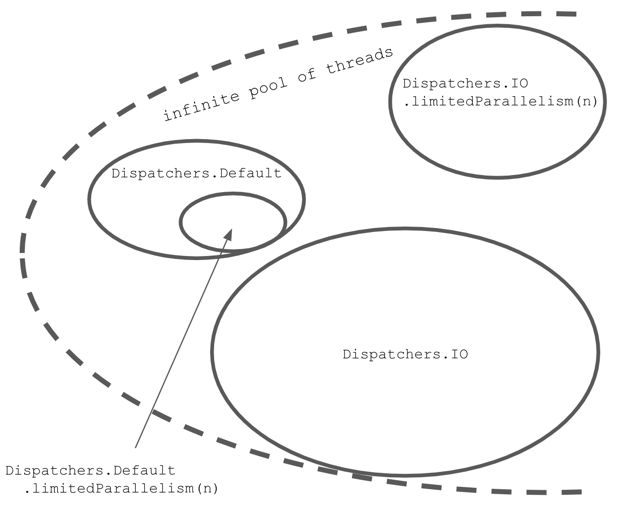
Dispatchers.Default is limited to the number of cores. Dispatchers.IO is limited to 64 (or the number of cores). Using limitedParallelism on Dispatchers.Default makes a dispatcher with an additional limit to Dispatchers.Default, whereas using it on Dispatcher.IO makes a dispatcher with a limit independent of Dispatcher.IO. However, all these dispatchers share the same infinite pool of threads.
Many developers find it a bit confusing that
limitedParallelism has different behavior for Dispatchers.IO, which has nothing to do with the Dispatchers.IO limit. I think we can make this much more intuitive by just adding a simple function to name the creation of a dispatcher that has an independent thread limit:fun limitedDispatcher(threadLimit: Int) = Dispatchers.IO .limitedParallelism(threadLimit)
The best practice for classes that might intensively block threads is to define their own dispatchers that have their own independent limits. How big should this limit be? You need to decide for yourself, but remember that many threads are inefficient use of our resources. On the other hand, waiting for an available thread is not good for performance. What is most essential is that this limit is independent of
Dispatcher.IO and other dispatchers' limits, therefore one service will not block another.class DiscUserRepository( private val discReader: DiscReader ) : UserRepository { private val dispatcher = Dispatchers.IO .limitParallelism(5) override suspend fun getUser(): UserData = withContext(dispatcher) { UserData(discReader.read("userName")) } }
Let's get back to the example with the newsletter and the registration confirmation emails. Each of these services should have its own dispatcher with a limit. This way, they will not block each other. The question is what the size of their limits should be. This is a hard question that has no simple answer. It depends on what we care about more: response time or resource usage. If we care more about response time, we should set a higher limit. If we care more about resource usage, we should set a lower limit. In this case, I don't care that the newsletters take a bit longer to send; it would be perfectly fine even if it took an hour, so I could use a small limit, like 5. On the other hand, I care about the registration confirmation emails being sent as soon as possible, and I don't think this service will ever be used too intensively, so I could set a much higher limit, like 50. Even in most extreme cases, I do not want to block too many threads, because it would expose us to attacks (a big number of requests could block enough threads to cause out-of-memory errors).
class NewsletterService {
    private val dispatcher = Dispatchers.IO.limitedParallelism(5)
    private val sendGrid = SendGrid(API_KEY)

    suspend fun sendNewsletter(
        newsletter: Newsletter,
        emails: List<Email>
    ) = withContext(dispatcher) {
        emails.forEach { email ->
            launch {
                sendGrid.api(createNewsletter(email, newsletter))
            }
        }
    }

    // ...
}

class AuthorizationService {
    private val dispatcher = Dispatchers.IO.limitedParallelism(50)

    suspend fun sendAuthEmail(
        user: User
    ) = withContext(dispatcher) {
        sendGrid.api(createConfirmationEmail(user))
    }

    // ...
}
Some developers like to have more control over the pools of threads they use, and Java offers a powerful API for that. For example, on JVM we can create a fixed or cached pool of threads with the
Executors class. These pools implement the ExecutorService or Executor interfaces, which we can transform into a dispatcher using the asCoroutineDispatcher function.private val NUMBER_OF_THREADS = 20 val dispatcher = Executors .newFixedThreadPool(NUMBER_OF_THREADS) .asCoroutineDispatcher()
limitedParallelismwas introduced inkotlinx-coroutinesversion 1.6; in previous versions, we often created dispatchers with independent pools of threads using theExecutorsclass.
Creating an executor with a fixed pool of threads can also be done using experimental multiplatform function
newFixedThreadPoolContext.private val NUMBER_OF_THREADS = 20 val dispatcher = newFixedThreadPoolContext( nThreads = 10, name = "background-thread" )
The biggest problem with this approach is that a dispatcher created with both those ways needs to be closed with the
close function. Developers often forget about this, which leads to leaking threads. Another problem is that when you create a fixed pool of threads, you are not using them efficiently because you will keep unused threads alive without sharing them with other services.For all dispatchers using multiple threads, we need to consider the shared state problem. In the example below, notice that 10,000 coroutines are increasing
i by 1. So, its value should be 10,000, but it is a smaller number. This is a result of a shared state (i property) modification on multiple threads at the same time.import kotlinx.coroutines.Dispatchers import kotlinx.coroutines.coroutineScope import kotlinx.coroutines.delay import kotlinx.coroutines.launch //sampleStart var i = 0 suspend fun main(): Unit = coroutineScope { repeat(10_000) { launch(Dispatchers.IO) { // or Default i++ } } delay(1000) println(i) // ~9930 } //sampleEnd
There are many ways to solve this problem (most will be described in the The problem with shared states chapter), but one option is to use a dispatcher with just a single thread. If we use just a single thread at a time, we do not need any other synchronization. The classic way to do this used to be to create such a dispatcher using
Executors. The problem with this is that this dispatcher keeps an extra thread active that needs to be closed when it is not used anymore. A modern solution is to use Dispatchers.Default or Dispatchers.IO (if we block threads) with parallelism limited to 1.val dispatcher = Dispatchers.IO .limitedParallelism(1) // previously: // val dispatcher = Executors.newSingleThreadExecutor() // .asCoroutineDispatcher()
import kotlinx.coroutines.*

//sampleStart
var i = 0

suspend fun main(): Unit = coroutineScope {
    val dispatcher = Dispatchers.Default
        .limitedParallelism(1)

    repeat(10000) {
        launch(dispatcher) {
            i++
        }
    }
    delay(1000)
    println(i) // 10000
}
//sampleEnd
Because we can use only one thread, the biggest disadvantage of using a dispatcher limited to a single thread is that our calls will be handled sequentially if we block it.
import kotlinx.coroutines.*
import kotlin.system.measureTimeMillis

suspend fun main(): Unit = coroutineScope {
    val dispatcher = Dispatchers.Default
        .limitedParallelism(1)

    val launch = launch(dispatcher) {
        repeat(5) {
            launch {
                Thread.sleep(1000)
            }
        }
    }
    val time = measureTimeMillis { launch.join() }
    println("Took $time") // Took 5006
}
The JVM platform introduced a new technology known as Project Loom[^207_7]. Its biggest innovation is the introduction of virtual threads, which are much lighter than regular threads. It costs much less to have blocked virtual threads than to have a regular thread blocked.
Project Loom does not have much to offer us developers who know Kotlin Coroutines because they have many more amazing features, like effortless cancellation or virtual time for testing[^207_5]. However, Project Loom can be truly useful when we use its virtual threads instead of
Dispatcher.IO, where we cannot avoid blocking threads[^207_6].To use Project Loom, we need to use JVM in the version over 19, and we currently need to enable preview features using the
--enable-preview flag. Then, we should be able to create an executor using newVirtualThreadPerTaskExecutor from Executors and transform it into a coroutine dispatcher.val LoomDispatcher = Executors .newVirtualThreadPerTaskExecutor() .asCoroutineDispatcher()
Such a dispatcher can also be implemented as an object declaration:
object LoomDispatcher : ExecutorCoroutineDispatcher() {

    override val executor: Executor = Executor { command ->
        Thread.startVirtualThread(command)
    }

    override fun dispatch(
        context: CoroutineContext,
        block: Runnable
    ) {
        executor.execute(block)
    }

    override fun close() {
        error("Cannot be invoked on Dispatchers.LOOM")
    }
}
To use this dispatcher similarly to other dispatchers, we can define an extension property on the
Dispatchers object. This should also help this dispatcher's discoverability.val Dispatchers.Loom: CoroutineDispatcher get() = LoomDispatcher
Now we only need to test if our new dispatcher really is an improvement. We expect it to take less memory and processor time than other dispatchers when we are blocking threads. We could set up the environment for precise measurements, or we could construct an example so extreme that anyone can observe the difference. For this book, I decided to use the latter approach. I started 100,000 coroutines, each blocked for 1 second. Making them do something else, like printing something or incrementing some value, should not change the result much. The execution of all these coroutines on
Dispatchers.Loom took a bit more than two seconds.suspend fun main(): Unit = measureTimeMillis { coroutineScope { repeat(100_000) { launch(Dispatchers.Loom) { Thread.sleep(1000) } } } }.let(::println) // 2 273
Let's compare this new dispatcher to an alternative. Using pure
Dispatchers.IO would not be fair as it is limited to 64 threads, and such function execution would take over 26 minutes. We should increment the thread limit to the number of coroutines. When I did that, such code execution took over 23 seconds, so ten times more. Of course, it consumed much more memory and processor time than the Dispatchers.Loom version. Whenever possible, we should use Dispatchers.Loom instead of Dispatchers.IO.import kotlinx.coroutines.* import kotlin.system.measureTimeMillis suspend fun main(): Unit = measureTimeMillis { val dispatcher = Dispatchers.IO .limitedParallelism(100_000) coroutineScope { repeat(100_000) { launch(dispatcher) { Thread.sleep(1000) } } } }.let(::println) // 23 803
At the moment, Project Loom is still young and hard to use, but I must say it is an exciting substitution for
Dispatchers.IO. However, you will likely not need it explicitly in the future as the Kotlin Coroutines team has expressed their willingness to use virtual threads by default once Project Loom is stable. I hope this happens soon.The last dispatcher we need to discuss is
Dispatchers.Unconfined, which is different from all the other dispatchers as it does not change any threads. When it is started, it runs on the thread on which it was started. If it is resumed, it runs on the thread that resumed it.import kotlinx.coroutines.* import kotlin.concurrent.thread import kotlin.coroutines.Continuation import kotlin.coroutines.resume //sampleStart fun main() { var continuation: Continuation<Unit>? = null thread(name = "Thread1") { runBlocking(Dispatchers.Unconfined) { println(Thread.currentThread().name) // Thread1 suspendCancellableCoroutine { continuation = it } println(Thread.currentThread().name) // Thread2 delay(1000) println(Thread.currentThread().name) // kotlinx.coroutines.DefaultExecutor (used by delay) } } thread(name = "Thread2") { Thread.sleep(1000) continuation?.resume(Unit) } } //sampleEnd
In older projects, you can find
Dispatchers.Unconfined used in unit tests. Imagine that you need to test a function that calls launch, for which synchronizing the time might not be easy. One solution is to use Dispatchers.Unconfined instead of all other dispatchers. If it is used in all scopes, everything runs on the same thread, and we can more easily control the order of operations. This trick is not needed anymore, as we have much better tools for testing coroutines. We will discuss this later in the book.From the performance point of view, this dispatcher is cheapest as it never requires thread switching, therefore we might choose it if we do not care at all which thread our code runs on. However, it is not considered good to use it so recklessly in practice. What if, by accident, we miss a blocking call and we are running on the
Main thread? This could lead to blocking the entire application. This is why we avoid using Dispatchers.Unconfined in production code, except for some special cases.When we use
runBlocking, it creates a special dispatcher that makes this coroutine and its children run on the thread that called runBlocking. This is why in the example below, all prints show Thread1, even after resuming the coroutine from another thread.fun main() { var continuation: Continuation<Unit>? = null thread(name = "Thread1") { runBlocking { println(Thread.currentThread().name) // Thread1 suspendCancellableCoroutine { continuation = it } println(Thread.currentThread().name) // Thread1 delay(1000) println(Thread.currentThread().name) // Thread1 } } thread(name = "Thread2") { Thread.sleep(1000) continuation?.resume(Unit) } }
This behavior might be surprising and can cause edge-case issued. It is the main reason why in modern days we prefer using suspending main function, instead of
runBlocking in main functions. This way, we avoid this special dispatcher and its surprising behavior.There is a cost associated with dispatching a coroutine. When
withContext is called, the coroutine needs to be suspended, possibly wait in a queue, and then be resumed. This is a small but unnecessary cost if we are already on this thread. Look at the function below:suspend fun showUser(user: User) = withContext(Dispatchers.Main) { userNameElement.text = user.name // ... }
If this function had already been called on the main dispatcher, we would have an unnecessary cost of redispatching. What is more, if there were a long queue for the Main thread because of
withContext, the user data might be shown after some delay (this coroutine would need to wait for other coroutines to do their job first). To prevent this, there is Dispatchers.Main.immediate, which dispatches only if it is needed. So, if the function below is called on the Main thread, it won't be re-dispatched: it will be called immediately.suspend fun showUser(user: User) = withContext(Dispatchers.Main.immediate) { userNameElement.text = user.name // ... }
We prefer
Dispatchers.Main.immediate as the withContext argument whenever this function might have already been called from the main dispatcher. Currently, the other dispatchers do not support immediate dispatching.Dispatching works based on the mechanism of continuation interception, which is built into the Kotlin language. There is a coroutine context named
ContinuationInterceptor, whose interceptContinuation method is used to modify a continuation when a coroutine is suspended[^207_3]. It also has a releaseInterceptedContinuation method that is called when a continuation is ended.public interface ContinuationInterceptor : CoroutineContext.Element { companion object Key : CoroutineContext.Key<ContinuationInterceptor> fun <T> interceptContinuation( continuation: Continuation<T> ): Continuation<T> fun releaseInterceptedContinuation( continuation: Continuation<*> ) { } //... }
The capability to wrap a continuation gives a lot of control. Dispatchers use
interceptContinuation to wrap a continuation with DispatchedContinuation, which runs on a specific pool of threads. This is how dispatchers work.The problem is that the same context is also used by many testing libraries, such as
runTest from kotlinx-coroutines-test. Each element in a context has to have a unique key, which is why we sometimes inject dispatchers into unit tests to replace them with test dispatchers. We will get back to this topic in the chapter dedicated to coroutine testing.class DiscUserRepository( private val discReader: DiscReader, private val dispatcher: CoroutineContext = Dispatchers.IO, ) : UserRepository { override suspend fun getUser(): UserData = withContext(dispatcher) { UserData(discReader.read("userName")) } } class UserReaderTests { @Test fun `some test`() = runTest { // given val discReader = FakeDiscReader() val repo = DiscUserRepository( discReader, // one of coroutines testing practices this.coroutineContext[ContinuationInterceptor]!! ) //... } }
To show how different dispatchers perform in different tasks, I made some benchmarks. In all these cases, the task is to run 100 independent coroutines with the same task. The columns represent different tasks: suspending for a second, blocking for a second, CPU-intensive operation, and memory-intensive operation (where the majority of the time is spent accessing, allocating, and freeing memory). Different rows represent the different dispatchers used for running these coroutines. The table below shows the average execution time in milliseconds.
| | Suspending | Blocking | CPU | Memory |
|---------------------|------------|----------|--------|--------|
| Single thread | 1 002 | 100 003 | 39 103 | 94 358 |
| Default (8 threads) | 1 002 | 13 003 | 8 473 | 21 461 |
| IO (64 threads) | 1 002 | 2 003 | 9 893 | 20 776 |
| 100 threads | 1 002 | 1 003 | 10 379 | 21 004 |
|---------------------|------------|----------|--------|--------|
| Single thread | 1 002 | 100 003 | 39 103 | 94 358 |
| Default (8 threads) | 1 002 | 13 003 | 8 473 | 21 461 |
| IO (64 threads) | 1 002 | 2 003 | 9 893 | 20 776 |
| 100 threads | 1 002 | 1 003 | 10 379 | 21 004 |
There are a few important observations you can make:
- When we are just suspending, it doesn't really matter how many threads we are using.
- When we are blocking, the more threads we are using, the faster all these coroutines will be finished.
- With CPU-intensive operations,
Dispatchers.Defaultis the best option[^207_2]. - If we are dealing with a memory-intensive problem, more threads might provide some (but not significant) improvement.
Here is how the tested functions look[^207_1]:
fun cpu(order: Order): Coffee {
    var i = Int.MAX_VALUE
    while (i > 0) {
        i -= if (i % 2 == 0) 1 else 2
    }
    return Coffee(order.copy(customer = order.customer + i))
}

fun memory(order: Order): Coffee {
    val list = List(1_000) { it }
    val list2 = List(1_000) { list }
    val list3 = List(1_000) { list2 }
    return Coffee(
        order.copy(
            customer = order.customer + list3.hashCode()
        )
    )
}

fun blocking(order: Order): Coffee {
    Thread.sleep(1000)
    return Coffee(order)
}

suspend fun suspending(order: Order): Coffee {
    delay(1000)
    return Coffee(order)
}
Dispatchers determine which thread or thread pool a coroutine will run (starting and resuming) on. The most important options are:
Dispatchers.Default, which we use for CPU-intensive operations;Dispatchers.Main, which we use to access the Main thread on Android, Swing, or JavaFX;Dispatchers.Main.immediate, which runs on the same thread asDispatchers.Mainbut is not redispatched if it is not necessary;Dispatchers.IO, which we use when we need to do some blocking operations;Dispatchers.IOwith limited parallelism or a custom dispatcher with a pool of threads, which we use when we might have many blocking calls;Dispatchers.DefaultorDispatchers.IOwith parallelism limited to 1, or a custom dispatcher with a single thread, which is used when we need to secure shared state modifications;Dispatchers.Unconfined, which does not change threads and is used in some special cases;
[^207_1]: The whole code can be found at https://kt.academy/dispatchers-benchmarks
[^207_2]: The main reason is that the more threads we use, the more time the processor needs to spend switching between them, thus it has less time to do meaningful operations. Also
[^207_3]: Wrapping needs to happen only once per continuation thanks to the caching mechanism.
[^207_4]: This mechanism is not deterministic.
[^207_5]: We will discuss this in the Testing Kotlin Coroutines chapter.
[^207_6]: The solution was inspired by the article Running Kotlin coroutines on Project Loom's virtual threads by Jan Vladimir Mostert.
[^207_7]: The stable version of Project Loom was released in September 2023 along with Java 21. Java 21 officially added the main features of Project Loom such as Virtual Threads (JEP 444) and Structured Concurrency (JEP 453).
[^207_2]: The main reason is that the more threads we use, the more time the processor needs to spend switching between them, thus it has less time to do meaningful operations. Also
Dispatchers.IO should not be used for CPU-intensive operations because it is used to block operations, and some other process might block all its threads.[^207_3]: Wrapping needs to happen only once per continuation thanks to the caching mechanism.
[^207_4]: This mechanism is not deterministic.
[^207_5]: We will discuss this in the Testing Kotlin Coroutines chapter.
[^207_6]: The solution was inspired by the article Running Kotlin coroutines on Project Loom's virtual threads by Jan Vladimir Mostert.
[^207_7]: The stable version of Project Loom was released in September 2023 along with Java 21. Java 21 officially added the main features of Project Loom such as Virtual Threads (JEP 444) and Structured Concurrency (JEP 453).


