

When a coroutine is suspended, the only thing that remains is its continuation. This continuation includes references to local variables, labels marking where each suspending function has stopped, and this coroutine context. That's all. However, coroutines need to keep more information than that: they also need to know their state, their relationships (parent and children), and more, so they keep this in a special context called Job.
Job is every coroutine's most important context. Every coroutine has its own job, and this is the only context not inherited from the parent. It cannot be inherited: every coroutine has its own state and its own relationships, so Job cannot be shared. Job cannot be set from the outside as every coroutine builder must create and control its own job.
Job is a context that implements the
Job interface and is identified by the Job key. It is cancellable and has a lifecycle. Job also has a state, which can be used to cancel a coroutine, await coroutine completion, and much more. Job is really important, so this chapter is dedicated to how it works.Every coroutine has its own job that can be accessed from its context using the
Job key.import kotlinx.coroutines.* fun main(): Unit = runBlocking { print(coroutineContext[Job]?.isActive) // true }
There is also an extension property,
job, which lets us access the job more easily.import kotlinx.coroutines.* import kotlin.coroutines.* // extension val CoroutineContext.job: Job get() = get(Job) ?: error("Current context doesn't...") // usage fun main(): Unit = runBlocking { print(coroutineContext.job.isActive) // true }
Asynchronous coroutine builders return their jobs, so they can be used elsewhere. This is clearly visible for
launch, where Job is an explicit result type.import kotlinx.coroutines.* //sampleStart fun main(): Unit = runBlocking { val job: Job = launch { delay(1000) println("Test") } } //sampleEnd
The type returned by the
async function is Deferred<T>, which also implements the Job interface.import kotlinx.coroutines.* //sampleStart fun main(): Unit = runBlocking { val deferred: Deferred<String> = async { delay(1000) "Test" } val job: Job = deferred } //sampleEnd
Job is the only coroutine context that is not inherited by a coroutine from another coroutine. Every coroutine creates its own Job, and the job from an argument or parent coroutine is used as a parent of this new job[^203_0].import kotlinx.coroutines.* fun main(): Unit = runBlocking { val name = CoroutineName("Some name") val job = Job() launch(name + job) { val childName = coroutineContext[CoroutineName] println(childName == name) // true val childJob = coroutineContext[Job] println(childJob == job) // false println(childJob == job.children.first()) // true } }
The parent can reference all its children, and the children can refer to the parent. This parent-child relationship enables the implementation of cancellation and exception handling inside a coroutine's scope. In most cases, Job is passed implicitly in the scope of a coroutine builder, as in the example below.
runBlocking is a parent of launch because launch can find its job in the scope provided by runBlocking.import kotlinx.coroutines.* fun main(): Unit = runBlocking { val parentJob: Job = coroutineContext.job val job: Job = launch { delay(1000) } println(job == parentJob) // false println(parentJob.children.first() == job) // true println(job.parent == parentJob) // true }
Structured concurrency mechanisms will not work if a new
Job context replaces the one from the parent.import kotlinx.coroutines.* fun main(): Unit = runBlocking { launch(Job()) { // the new job replaces one from parent delay(1000) println("Will not be printed") } } // (prints nothing, finishes immediately)
In the above example,
runBlocking does not wait for launch because it has no relation with it. This is because launch uses the job from the argument as a parent.When a coroutine has its own (independent) job, it has nearly no relation to its parent. It inherits other contexts, but other consequences of the parent-child relationship do not apply. This causes us to lose structured concurrency, which is a problematic situation that should be avoided.
Every coroutine has its own state that is managed by its job. State lifecycle is essential for the basic mechanisms of coroutines, like cancellation and synchronization. Here is a graph of states and the transitions between them:
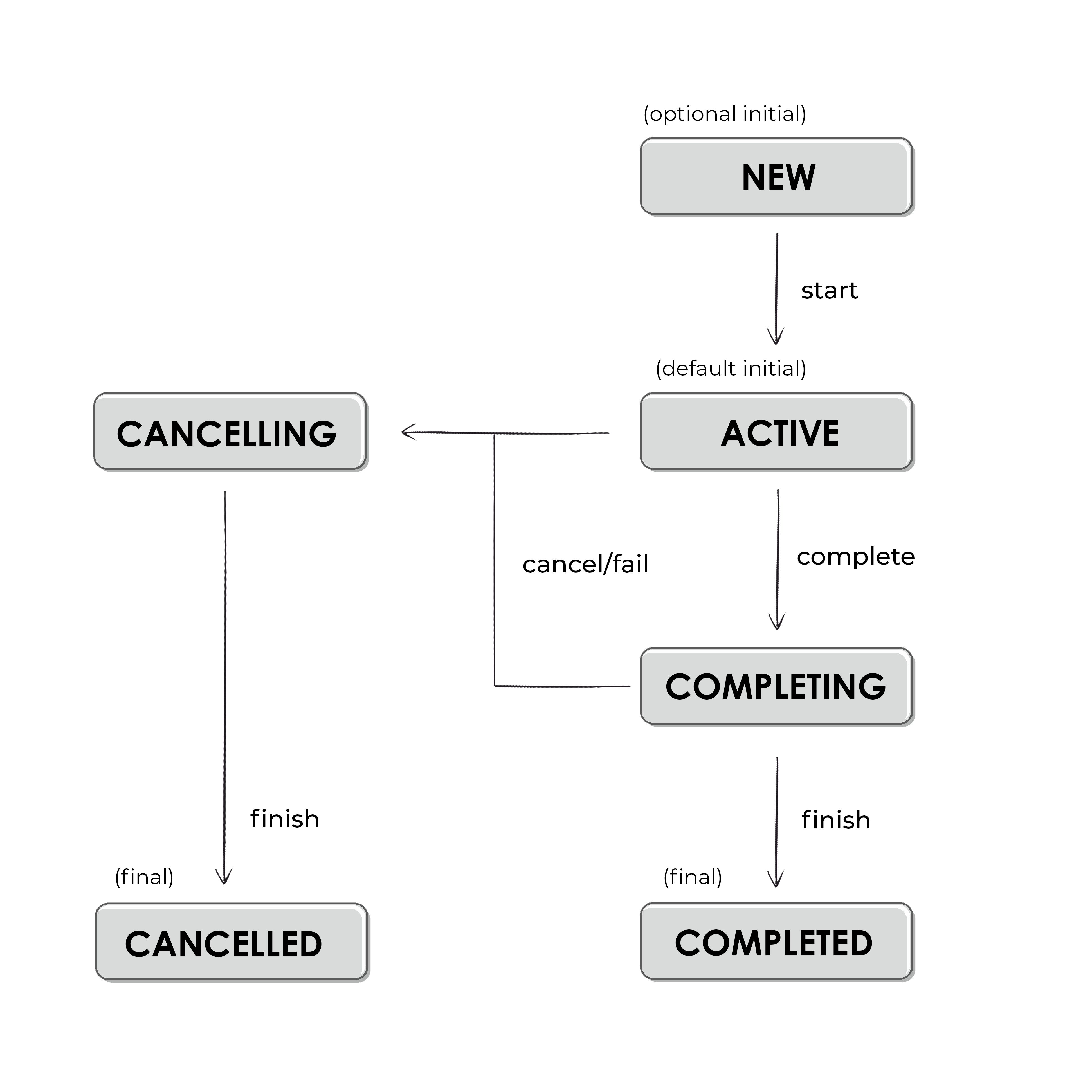
A diagram of job (so also coroutine) states.
In the "Active" state, a job is running. If the job was created with a coroutine builder, this is the state where the body of this coroutine will be executed. In this state, we can start child coroutines. Most coroutines will start in the "Active" state. Only those that are started lazily will start in the "New" state, so these need to be explicitly started (using
start method) in order for them to move to the "Active" state. When a coroutine is executing its body, it is definitely in the "Active" state. When body execution is finished, its state changes to "Completing", where this coroutine waits for its children's completion. Once all its children have completed, the job (coroutine) changes its state to "Completed", which is a terminal state. Alternatively, if a job is cancelled or fails during the "Active" or "Completing" state, its state will change to "Cancelling". In this state, we have the last chance to do some clean-up, like closing connections or freeing resources (we will see how to do this in the next chapter). Once this is done, the job will move to the "Cancelled" state.The state is displayed in a job's
toString[^203_2]. In the example below, we see different jobs as their states change. The last one is started lazily, which means it does not start automatically. All the others will immediately become active once created.import kotlinx.coroutines.* suspend fun main(): Unit = coroutineScope { // Job created with a builder is active val job = Job() println(job) // JobImpl{Active}@ADD // until we complete it with a method job.complete() println(job) // JobImpl{Completed}@ADD // launch is initially active by default val activeJob = launch { delay(1000) } println(activeJob) // StandaloneCoroutine{Active}@ADD // here we wait until this job is done activeJob.join() // (1 sec) println(activeJob) // StandaloneCoroutine{Completed}@ADD // launch started lazily is in New state val lazyJob = launch(start = CoroutineStart.LAZY) { delay(1000) } println(lazyJob) // LazyStandaloneCoroutine{New}@ADD // we need to start it, to make it active lazyJob.start() println(lazyJob) // LazyStandaloneCoroutine{Active}@ADD lazyJob.join() // (1 sec) println(lazyJob) //LazyStandaloneCoroutine{Completed}@ADD }
To check the state in code, we use the properties
isActive, isCompleted, and isCancelled.| State | isActive | isCompleted | isCancelled |
|--------------------------------|----------|-------------|-------------|
| New (optional initial state) | false | false | false |
| Active (default initial state) | true | false | false |
| Completing (transient state) | true | false | false |
| Cancelling (transient state) | false | false | true |
| Cancelled (final state) | false | true | true |
| Completed (final state) | false | true | false |
|--------------------------------|----------|-------------|-------------|
| New (optional initial state) | false | false | false |
| Active (default initial state) | true | false | false |
| Completing (transient state) | true | false | false |
| Cancelling (transient state) | false | false | true |
| Cancelled (final state) | false | true | true |
| Completed (final state) | false | true | false |
The
Job interface also offers us some useful functions that can be used to interact with the job. Let's start with join, which is used to wait for the job to complete.A coroutine's job can be used to wait until it completes. To do this, we use the
join method, which suspends until a concrete job reaches a final state (either "Cancelled" or "Completed").import kotlinx.coroutines.* fun main(): Unit = runBlocking { val job1 = launch { delay(1000) println("Test1") } val job2 = launch { delay(2000) println("Test2") } job1.join() job2.join() println("All tests are done") } // (1 sec) // Test1 // (1 sec) // Test2 // All tests are done
The
Job interface also exposes a children property that lets us reference all its children. We might as well use it to wait until all children are in a final state.import kotlinx.coroutines.* fun main(): Unit = runBlocking { launch { delay(1000) println("Test1") } launch { delay(2000) println("Test2") } val children = coroutineContext[Job] ?.children val childrenNum = children?.count() println("Number of children: $childrenNum") children?.forEach { it.join() } println("All tests are done") } // Number of children: 2 // (1 sec) // Test1 // (1 sec) // Test2 // All tests are done
It is not uncommon to use
join to synchronize coroutines. Consider the following example: we have an order that needs to be completed. We need to create an order, create an invoice, deliver the order, and send an email. We want to make sure that the order is created before we mark it as invoiced. We also want to make sure that the invoice is created before we mark the order as delivered. We also want to make sure that the order is marked as invoiced and delivered before we send an email. We can use join to synchronize these operations.suspend fun completeOrder(order: Order) = coroutineScope { val createOrderJob = launch { orderService.createOrder(order) } val invoiceJob = launch { val invoiceId = invoiceService.createInvoice(order) createOrderJob.join() orderService.markOrderAsInvoiced(order, invoiceId) } val deliveryJob = launch { val deliveryId = deliveryService.orderDelivery(order) invoiceJob.join() orderService.markOrderAsDelivered(order, deliveryId) } invoiceJob.join() deliveryJob.join() sendEmail(order) }
Instead of usingjoin, you might also useawaitfromasyncto wait for the result of a coroutine. The only difference is thatawaitreturns the result of the coroutine, whilejoinreturnsUnit.
A
Job can be created without a coroutine using the Job() factory function. Job() creates a job that isn't associated with any coroutine and can be used as a context. This also means that we can use such a job as a parent of many coroutines. However, using such a job as a parent is tricky and I recommend avoiding it.A common mistake is creating a job using the
Job() factory function then using it as a parent for some coroutines, then using join on the job. Such a program will never end because Job is still in the "Active" state, even when all its children are finished. This is because this context is still ready to be used by other coroutines.import kotlinx.coroutines.* //sampleStart suspend fun main(): Unit = coroutineScope { val job = Job() launch(job) { // the new job replaces one from parent delay(1000) println("Text 1") } launch(job) { // the new job replaces one from parent delay(2000) println("Text 2") } job.join() // Here we will await forever println("Will not be printed") } // (1 sec) // Text 1 // (1 sec) // Text 2 // (runs forever) //sampleEnd
A better approach would be to join all the job's current children.
import kotlinx.coroutines.*

//sampleStart
suspend fun main(): Unit = coroutineScope {
    val job = Job()
    launch(job) { // the new job replaces one from parent
        delay(1000)
        println("Text 1")
    }
    launch(job) { // the new job replaces one from parent
        delay(2000)
        println("Text 2")
    }
    job.children.forEach { it.join() }
}
// (1 sec)
// Text 1
// (1 sec)
// Text 2
//sampleEnd
Job() is an example of the fake constructor pattern[^203_1]. At first, you might think that you're calling a constructor of Job, but you might then realize that Job is an interface, and interfaces cannot have constructors. The reality is that Job is a simple function that looks like a constructor. Moreover, the actual type returned by this function is not a Job but its subinterface CompletableJob.public fun Job(parent: Job? = null): CompletableJob
The
CompletableJob interface extends the functionality of the Job interface by providing two additional methods:complete(): Boolean- used to change this job's state to "Completing". In this state, the job waits for all its children to complete; once they are done, it changes its state to "Completed". Once a coroutine is "Completing" or "Completed", it cannot move back to the "Active" state. The result ofcompleteistrueif this job has completed as a result of this invocation; otherwise, it isfalse(if it has already completed).
import kotlinx.coroutines.Job
import kotlinx.coroutines.delay
import kotlinx.coroutines.launch
import kotlinx.coroutines.runBlocking

//sampleStart
fun main(): Unit = runBlocking {
    val job = Job()

    launch(job) {
        repeat(5) { num ->
            delay(200)
            println("Rep$num")
        }
    }

    launch {
        delay(500)
        job.complete()
    }

    job.join()

    launch(job) {
        println("Will not be printed")
    }

    println("Done")
}
// Rep0
// Rep1
// Rep2
// Rep3
// Rep4
// Done
//sampleEnd
completeExceptionally(exception: Throwable): Boolean- Completes this job with a given exception. This means that all children will be cancelled immediately (withCancellationExceptionwrapping the exception provided as an argument). The result ofcompleteistrueif this job has completed as a result of this invocation; otherwise, it isfalse(if it has already completed).
import kotlinx.coroutines.Job
import kotlinx.coroutines.delay
import kotlinx.coroutines.launch
import kotlinx.coroutines.runBlocking
import java.lang.Error

//sampleStart
fun main(): Unit = runBlocking {
    val job = Job()

    launch(job) {
        repeat(5) { num ->
            delay(200)
            println("Rep$num")
        }
    }

    launch {
        delay(500)
        job.completeExceptionally(Error("Some error"))
    }

    job.join()

    launch(job) {
        println("Will not be printed")
    }

    println("Done")
}
// Rep0
// Rep1
// Done
//sampleEnd
The
complete function can be used after we start the last coroutine on a job. Thanks to this, we can just use the join function to wait for the job to complete.import kotlinx.coroutines.* //sampleStart suspend fun main(): Unit = coroutineScope { val job = Job() launch(job) { // the new job replaces one from parent delay(1000) println("Text 1") } launch(job) { // the new job replaces one from parent delay(2000) println("Text 2") } job.complete() job.join() } // (1 sec) // Text 1 // (1 sec) // Text 2 //sampleEnd
You can pass a reference to the parent as an argument of the
Job function. Thanks to this, such a job will be cancelled when the parent is.import kotlinx.coroutines.* //sampleStart suspend fun main(): Unit = coroutineScope { val parentJob = Job() val job = Job(parentJob) launch(job) { delay(1000) println("Text 1") } launch(job) { delay(2000) println("Text 2") } delay(1100) parentJob.cancel() job.children.forEach { it.join() } } // Text 1 //sampleEnd
It is not uncommon to use
join from Job to synchronize coroutines. For instance, if you want to make sure that an operation is started after another coroutine is finished, you can use join from the job of the first coroutine.class SomeService( private val scope: CoroutineScope ) { fun startTasks() { val job = scope.launch { // ... } scope.launch { // ... job.join() // ... } } }
In a similar way, we could collect a whole collection of jobs and wait for all of them to finish. The same can be done with
async and await. The result of await is Deferred, which is a subtype of Job, so we can also use join, but more often we use await, which additionally returns the result of the coroutine.An exceptionally useful class for synchronizing coroutines is
CompletableDeferred, which represents a deferred value with a completion function. So, CompletableDeferred is like a box for a value that can be completed with a value (complete) or an exception (completeExceptionally); it also has a waiting point, where a coroutine can wait using await until this CompletableDeferred is completed.import kotlinx.coroutines.* fun main(): Unit = runBlocking { val deferred = CompletableDeferred<String>() launch { println("Starting first") delay(1000) deferred.complete("Test") delay(1000) println("First done") } launch { println("Starting second") println(deferred.await()) // Wait for deferred to complete println("Second done") } } // Starting first/Starting second // (1 sec) // Test // Second done // (1 sec) // First done
CompletableDeferred is useful when some coroutines need to await some value or event, that is produced by another coroutine. CompletableDeferred accepts only one value that can be awaited multiple times by multiple coroutines. If you want to have multiple values, you should use Channel instead. Channel is explained in a dedicated chapter.In this chapter, we learned that:
Jobis the most important context for every coroutine. It is cancellable and has a lifecycle. It also has a state, and it can be used to cancel coroutines, track their state, and much more.- Every coroutine has its own job, which is the only context not inherited from the parent. A job from an argument or parent coroutine is used as a parent of this new job.
- Coroutines can be in one of the following states: "New", "Active", "Completing", "Completed", "Cancelling", and "Cancelled". Regular coroutines start in the "Active" state; when they finish their body execution, they move to the "Completing" state; then, once their children are completed, they move to the "Completed" state.
- You should avoid using
Job()as an explicit parent of coroutines as this can lead to unexpected behavior. Jobcan be used to synchronize coroutines. We can usejointo wait for a coroutine to complete, or we can useCompletableDeferredto wait for a value produced by another coroutine.
The next two chapters describe cancellation and exception handling in Kotlin Coroutines. These two important mechanisms fully depend on the child-parent relationship that is created using
Job.[^203_0]: Yes, I repeat myself, but if there is one thing that I want you to remember, it is that
[^203_1]: A pattern that is well described in Effective Kotlin Item 32: Consider factory functions instead of constructors.
[^203_2]: I hope I don't need to remind the reader that
Job is not inherited.[^203_1]: A pattern that is well described in Effective Kotlin Item 32: Consider factory functions instead of constructors.
[^203_2]: I hope I don't need to remind the reader that
toString should be used for debugging and logging purposes; it should not be parsed in code as this would break this function's contract, as I describe in Effective Kotlin.


