

This is a chapter from the book Kotlin Essentials. You can find it on LeanPub or Amazon. It is also available as a course.
When Andrey Breslav, the initial Kotlin creator, was asked about his favourite feature during a discussion panel at KotlinConf Amsterdam, he said it was functions[^06_1]. In the end, functions are our programs' most important building blocks. If you look at real-life applications, most of the code either defines or calls functions.
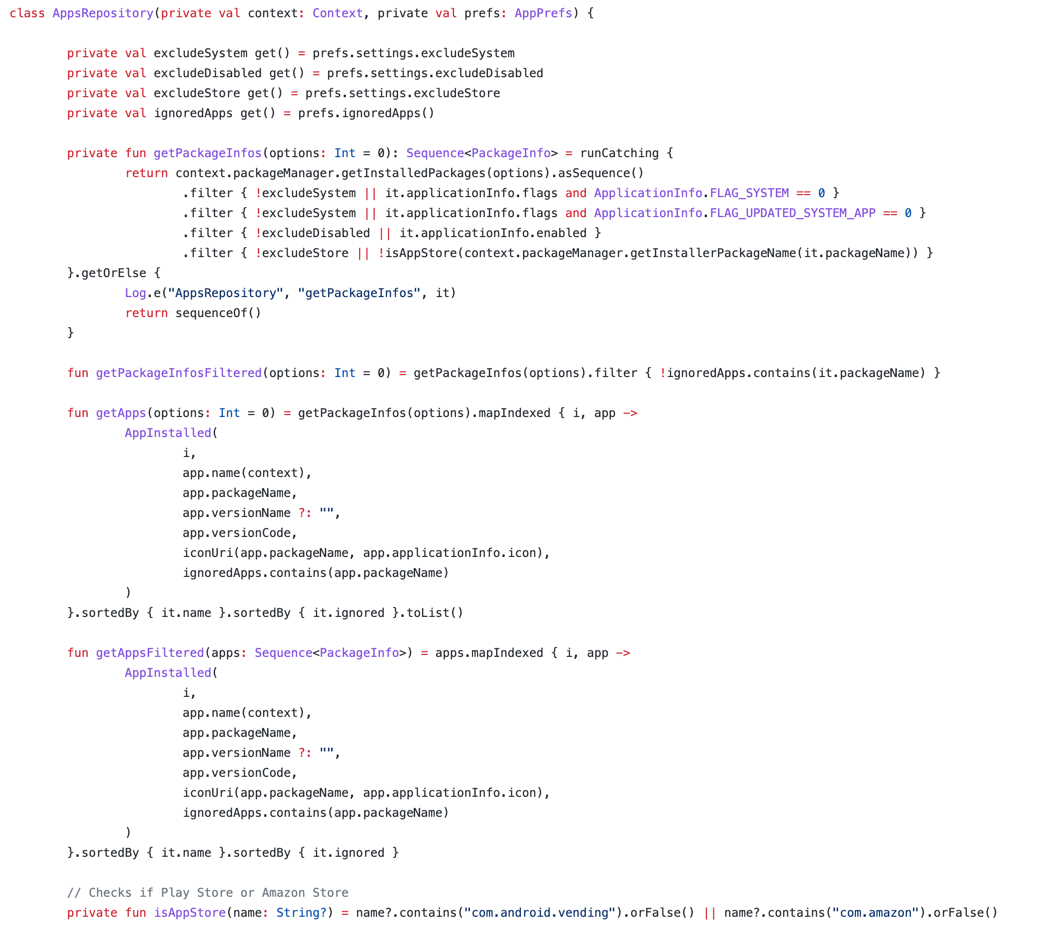
As an example, I used a random class from the APKUpdater open-source project. Notice that nearly every line either defines or calls a function.
In Kotlin, we define functions using the
fun keyword. This is why we have so much "fun" in Kotlin. With a bit of creativity, a function can consist only of fun:fun <Fun> `fun`(`fun`: Fun): Fun = `fun`
This is the so-called identity function, a function that returns its argument without any modifications. It has a generic type parameterFun, but this will be explained in the chapter Generics.
By convention, we name functions using lower camelCase syntax[^06_0]. Formally, we can use characters, underscore
_, and numbers (but not at the first position), but in general just characters should be used.
In Kotlin, we name functions with lowerCamelCase.
This is what a typical function looks like:
fun square(x: Double): Double {
    return x * x
}

fun main() {
    println(square(10.0)) // 100.0
}
Notice that the parameter type is specified after the variable name and a colon, and the result type is specified after a colon inside the parameter brackets. Such notation is typical of languages with powerful support for type inference because it is easier to add or remove explicit type definitions.
val a: Int = 123
// easy to transform from or to
val a = 123

fun add(a: Int, b: Int): Int = a + b

// easy to transform from or to
fun add(a: Int, b: Int) = a + b
To use a reserved keyword as a function name (like
fun or when), use backticks, as in the example below. When a function has an illegal name, both its definition and calls require backticks.Another use case for backticks is naming unit-test functions so that they can be described in plain English, as in the example below. This is not standard practice, but it is still quite a popular practice that many teams choose to adopt.
class CartViewModelTests {
    @Test
    fun `should show error dialog when no items loaded`() {
        ...
    }
}
Many functions in real-life projects just have a single expression[^06_2], so they start and immediately use the
return keyword. The square function defined above is a great example. For such functions, instead of defining the body with braces, we can use the equality sign (=) and just specify the expression that calculates the result without specifying return. This is single-expression syntax, and functions that use it are called single-expression functions.fun square(x: Double): Double = x * x fun main() { println(square(10.0)) // 100.0 }
An expression can be more complicated and take multiple lines. This is fine as long as its body is a single statement.
fun findUsers(userFilter: UserFilter): List<User> =
    userRepository
        .getUsers()
        .map { it.toDomain() }
        .filter { userFilter.accepts(it) }
When we use single-expression function syntax, we can infer the result type. We don’t need to, as explicit result type might still be useful for safety and readability[^06_3], but we can.
fun square(x: Double) = x * x

fun main() {
    println(square(10.0)) // 100.0
}
Kotlin allows us to define functions on many levels, but this isn’t very obvious as Java only allows functions inside classes. In Kotlin, we can define:
- functions in files outside any classes, called top-level functions,
- functions inside classes or objects, called member functions (they are also called methods),
- functions inside functions, called local functions or nested functions.
// Top-level function
fun double(i: Int) = i * 2

class A {
    // Member function (method)
    private fun triple(i: Int) = i * 3

    // Member function (method)
    fun twelveTimes(i: Int): Int {
        // Local function
        fun fourTimes() = double(double(i))
        return triple(fourTimes())
    }
}

// Top-level function
fun main(args: Array<String>) {
    double(1) // 2
    A().twelveTimes(2) // 24
}
Top-level functions (defined outside classes) are often used to define utils, small but useful functions that help us with development. Top-level functions can be moved and split across files. In many cases, top-level functions in Kotlin are better than static functions in Java. Using them seems intuitive and convenient for developers.
However, it’s a different story with local functions (defined inside functions). I often see that developers lack the imagination to use them (due to lack of exposure to them). Local functions are popular in JavaScript and Python, but there’s nothing like this in Java. The power of local functions is that they can directly access or modify local variables. They are used to extract repetitive code inside a function that operates on local variables. Longer functions should tell a "story", and local subroutines can wrap a block expression in a descriptive name.
Take a look at the below example, which presents a function that validates a form. It checks conditions for the form fields. If a condition is not matched, we should show an error and change the local variable
isValid to false, in which case we should not return from the function because we want to check all the fields (we should not stop at the first one that fails). This is an example of where a local function can help us extract repetitive behavior.fun validateForm() { var isValid = true val errors = mutableListOf<String>() fun addError(view: FormView, error: String) { view.error = error errors += error isValid = false } val email = emailView.text if (email.isBlank()) { addError(emailView, "Email cannot be empty or blank") } val pass = passView.text.trim() if (pass.length < 3) { addError(passView, "Password too short") } if (isValid) { tryLogin(email, pass) } else { showErrors(errors) } }
A variable defined as a part of a function definition is called a parameter. The value that is passed when we call a function is called an argument.
fun square(x: Double) = x * x // x is a parameter

fun main() {
    println(square(10.0)) // 10.0 is an argument
    println(square(0.0)) // 0.0 is an argument
}
In Kotlin, parameters are read-only, so we cannot reassign their value.
fun a(i: Int) {
    i = i + 10 // ERROR
    // ...
}
If you need to modify a parameter variable, the only way is to shadow it with a local variable that is mutable.
fun a(i: Int) {
    var i = i + 10
    // ...
}
This is possible but discouraged. A parameter holds a value that was used as an argument, and this value should not change. A local read-write variable represents a different concept and should therefore have a different name.
In Kotlin, all functions have a result type, so every function call is an expression. When a type is not specified, the default result type is
Unit, and the default result value is the Unit object.fun someFunction() {} fun main() { val res: Unit = someFunction() println(res) // kotlin.Unit }
Unit is just a very simple object that is used as a placeholder when nothing else is returned. When you specify a function without an explicit result type, its result type will implicitly be Unit. When you define a function without return in the last line, it is the same as using return with no value. Using return with no value is the same as returning Unit.fun a() {} // the same as fun a(): Unit {} // the same as fun a(): Unit { return } // the same as fun a(): Unit { return Unit }
Each parameter expects one argument, except for parameters marked with the
vararg modifier. Such parameters accept any number of arguments.fun a(vararg params: Int) {} fun main() { a() a(1) a(1, 2) a(1, 2, 3, 4, 5, 6, 7, 8, 9, 10) }
A good example of such a function is
listOf, which produces a list from values used as arguments.fun main() { println(listOf(1, 3, 5, 6)) // [1, 3, 5, 6] println(listOf("A", "B", "C")) // [A, B, C] }
This means a vararg parameter holds a collection of values, therefore it cannot have the type of a single object. So the vararg parameter represents an array of the declared type, and we can iterate over arrays using a for loop (which will be explained in more depth in the next chapter).
fun concatenate(vararg strings: String): String {
    // The type of `strings` is Array<String>
    var accumulator = ""
    for (s in strings) accumulator += s
    return accumulator
}

fun sum(vararg ints: Int): Int {
    // The type of `ints` is IntArray
    var accumulator = 0
    for (i in ints) accumulator += i
    return accumulator
}

fun main() {
    println(concatenate()) //
    println(concatenate("A", "B")) // AB
    println(sum()) // 0
    println(sum(1, 2, 3)) // 6
}
We will get back to vararg parameters in the chapter Collections, in the section dedicated to arrays.
When we declare functions, we often specify optional parameters. A good example is
joinToString, which transforms an iterable into a String. It can be used without any arguments, or we might change its behavior with concrete arguments.fun main() { val list = listOf(1, 2, 3, 4) println(list.joinToString()) // 1, 2, 3, 4 println(list.joinToString(separator = "-")) // 1-2-3-4 println(list.joinToString(limit = 2)) // 1, 2, ... }
Many more functions in Kotlin use optional parametrization, but how is this done? It is enough to place an equality sign after a parameter and then specify the default value.
fun cheer(how: String = "Hello,", who: String = "World") {
    println("$how $who")
}

fun main() {
    cheer() // Hello, World
    cheer("Hi") // Hi World
}
Values specified this way are created on-demand when there is no parameter for their position. This is not Python, therefore they are not stored statically, which is why it’s safe to use mutable values as default arguments.
fun addOneAndPrint(list: MutableList<Int> = mutableListOf()) {
    list.add(1)
    println(list)
}

fun main() {
    addOneAndPrint() // [1]
    addOneAndPrint() // [1]
    addOneAndPrint() // [1]
}
In Python, the analogous code would produce[1],[1, 1], and[1, 1, 1].
When we call a function, we can specify an argument’s position by its parameter name, like in the example below. This way, we can specify later optional positions without specifying previous ones. This is called named parameter syntax.
fun cheer(how: String = "Hello,", who: String = "World") {
    print("$how $who")
}

fun main() {
    cheer(who = "Group") // Hello, Group
}
Named parameter syntax is very useful for improving our code’s readability. When an argument's meaning is not clear, it is better to specify a parameter name for it.
fun main() {
    val list = listOf(1, 2, 3, 4)
    println(list.joinToString("-")) // 1-2-3-4
    // better
    println(list.joinToString(separator = "-")) //  1-2-3-4
}
Naming arguments also prevents mistakes that are a result of changing parameter positions.
class User(
    val name: String,
    val surname: String,
)

val user = User(
    name = "Norbert",
    surname = "Moskała",
)
In the above example, without named arguments a developer might flip the
name and surname positions; if named arguments were not used here, this would lead to an incorrect name and surname in the object. Named arguments protect us from such situations.It is considered a good practice to use the named arguments convention when we call functions with many arguments, some of whose meanings might not be obvious to developers reading our code in the future.
In Kotlin, we can define functions with the same name in the same scope (file or class) as long as they have different parameter types or a different number of parameters. This is known as function overloading. Kotlin decides which function to execute based on the types of the specified arguments.
fun a(a: Any) = "Any"
fun a(i: Int) = "Int"
fun a(l: Long) = "Long"

fun main() {
    println(a(1)) // Int
    println(a(18L)) // Long
    println(a("ABC")) // Any
}
A practical example of function overloading is providing multiple function variants for user convenience.
import java.math.BigDecimal

class Money(val amount: BigDecimal, val currency: String)

fun pln(amount: BigDecimal) = Money(amount, "PLN")
fun pln(amount: Int) = pln(amount.toBigDecimal())
fun pln(amount: Double) = pln(amount.toBigDecimal())
Methods with a single parameter can use the
infix modifier, which allows a special kind of function call: without the dot and the argument parentheses.class View class ViewInteractor { infix fun clicks(view: View) { // ... } } fun main() { val aView = View() val interactor = ViewInteractor() // regular notation interactor.clicks(aView) // infix notation interactor clicks aView }
This notation is used by some functions from Kotlin stdlib (Standard Library), like the
and, or and xor bitwise operations on numbers (presented in the chapter Basic types, their literals and operations).fun main() { // infix notation println(0b011 and 0b001) // 1, that is 0b001 println(0b011 or 0b001) // 3, that is 0b011 println(0b011 xor 0b001) // 2, that is 0b010 // regular notation println(0b011.and(0b001)) // 1, that is 0b001 println(0b011.or(0b001)) // 3, that is 0b011 println(0b011.xor(0b001)) // 2, that is 0b010 }
Infix notation is only for our convenience. It is an example of Kotlin syntactic sugar - syntax that is designed only to make things easier to read or express.
Regarding the position of operators or functions in relation to their operands or arguments, we use three kinds of position types: prefix, infix, and postfix. Prefix notation is when we place the operator or function before the operands or arguments[^06_8]. A good example is a plus or minus placed before a single number (like+12or-3.14). One might argue that a top-level function call also uses prefix notation because the function name comes before the arguments (likemaxOf(10, 20)). Infix notation is when we place the operator or function between the operands or arguments[^06_6]. A good example is a plus or minus between two numbers (like1 + 2or10 - 7). One might argue that a method call with arguments also uses infix notation because the function name comes between the receiver (the object we call this method on) and arguments (likeaccount.add(money)). In Kotlin, we use the term "infix notation" more restrictively to reference the special notation we use for methods with theinfixmodifier. Postfix notation is when we place the operator or function after the operands or arguments[^06_7]. In modern programming, postfix notation is practically not used anymore. One might argue that calling a method with no arguments is postfix notation, as instr.uppercase().
When a function declaration (name, parameters, and result type) is too long to fit in a single line, we split it such that every parameter definition is on a different line, and the beginning and end of the function declaration are also on separate lines.
fun veryLongFunction(
    param1: Param1Type,
    param2: Param2Type,
    param3: Param3Type,
): ResultType {
    // body
}
Classes are formatted in the same way[^06_5]:
class VeryLongClass(
    val property1: Type1,
    val property2: Type2,
    val property3: Type3,
) : ParentClass(), Interface1, Interface2 {
    // body
}
When a function call[^06_4] is too long, we format it similarly: each argument is on a different line. However, there are exceptions to this rule, such as keeping multiple vararg parameters on the same line.
fun makeUser(
    name: String,
    surname: String,
): User = User(
    name = name,
    surname = surname,
)

class User(
    val name: String,
    val surname: String,
)

fun main() {
    val user = makeUser(
        name = "Norbert",
        surname = "Moskała",
    )

    val characters = listOf(
        "A", "B", "C", "D", "E", "F", "G", "H", "I", "J",
        "K", "L", "M", "N", "O", "P", "R", "S", "T", "U",
        "W", "X", "Y", "Z",
    )
}
In this book, the width of my lines is much smaller than in regular projects, so I am forced to break lines much more often than I would like to.
Notice that when I specify arguments or parameters, I sometimes add a comma at the end. This is a so-called trailing comma. Such notation is optional.
fun printName(
    name: String,
    surname: String, // <- trailing comma
) {
    println("$name $surname")
}

fun main() {
    printName(
        name = "Norbert",
        surname = "Moskała", // <- trailing comma
    )
}
I like using trailing comma notation because it makes it easier to add another element in the future. Without it, adding or removing an element requires not only a new line but also an additional comma after the last element. This leads to meaningless line modifications on Git, which makes it harder to read what has actually changed in our project. Some developers don’t like trailing comma notation, which can sometimes lead to a holy war. Decide in your team if you like it or not, and be consistent in your projects.
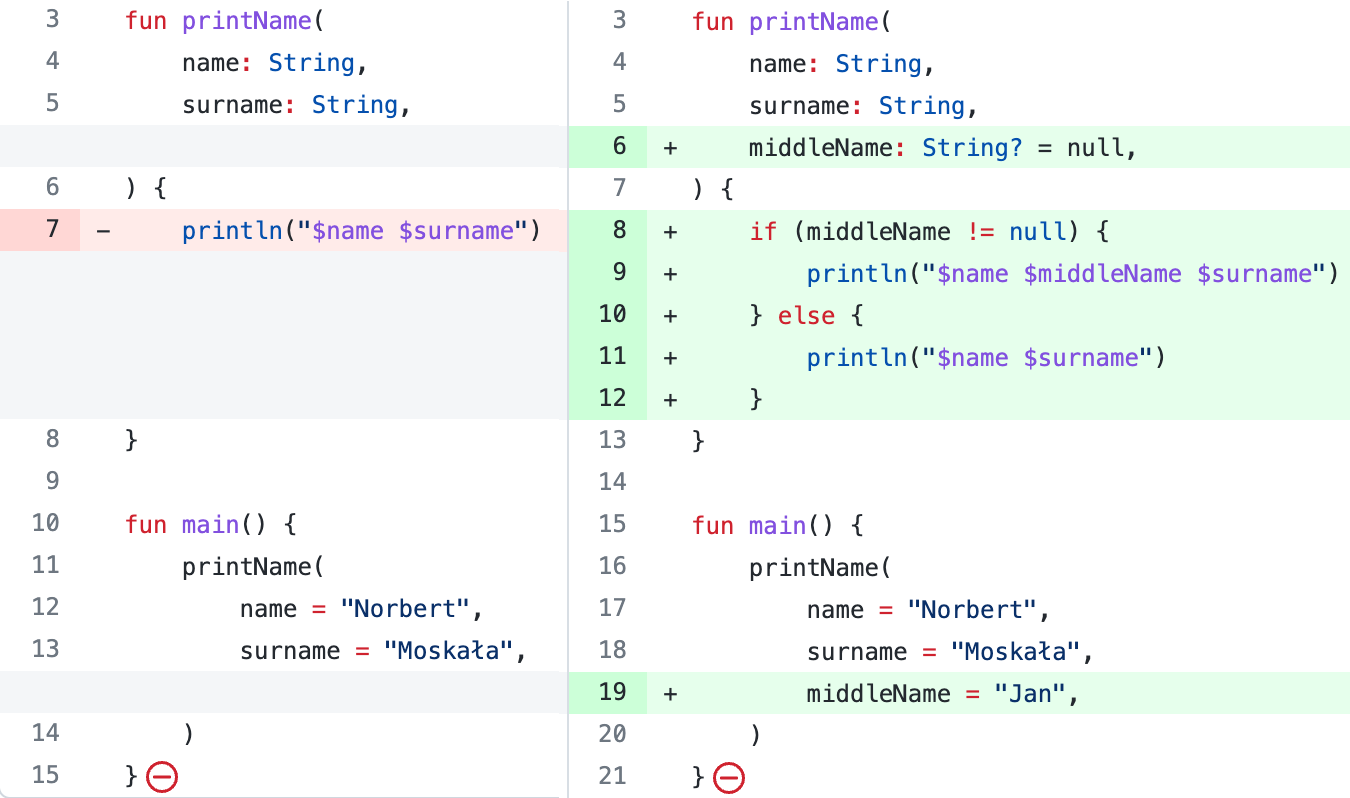
Adding a parameter and an argument on git when a trailing comma is used.

Adding a parameter and an argument on git when a trailing comma is not used.
As you can see, functions in Kotlin have a lot of powerful features. Single-expression syntax makes simple functions shorter. Named and default arguments help us improve safety and readability. The
Unit result type makes every function call an expression. Vararg parameters allow any number of arguments to be used for one parameter position. Infix notation introduces a more convenient way to call certain kinds of functions. Trailing commas minimize the number of changes on git. All this is for our convenience. For now though, let's move on to another topic: using a for-loop.[^06_0]: This rule has some exceptions. For example, on Android, Jetpack Compose functions should be named using UpperCamelCase by convention. Also, unit tests are often named with full sentences inside braces.
[^06_1]: Source: youtu.be/heqjfkS4z2I?t=660
[^06_2]: As a reminder, an expression is a part of our code that returns a value.
[^06_3]: See Effective Kotlin Item 14: Consider referencing receivers explicitly
[^06_4]: A constructor call is also considered a function call in Kotlin.
[^06_5]: We will discuss classes later in this book, in the chapter Classes and interfaces.
[^06_6]: From the Latin word infixus, the past participle of infigere, which we might translate as "fixed in between".
[^06_7]: Made from the prefix "post-", which means "after, behind", and the word "fix", meaning "fixed in place".
[^06_8]: From the Latin word praefixus, which means "fixed in front".
[^06_1]: Source: youtu.be/heqjfkS4z2I?t=660
[^06_2]: As a reminder, an expression is a part of our code that returns a value.
[^06_3]: See Effective Kotlin Item 14: Consider referencing receivers explicitly
[^06_4]: A constructor call is also considered a function call in Kotlin.
[^06_5]: We will discuss classes later in this book, in the chapter Classes and interfaces.
[^06_6]: From the Latin word infixus, the past participle of infigere, which we might translate as "fixed in between".
[^06_7]: Made from the prefix "post-", which means "after, behind", and the word "fix", meaning "fixed in place".
[^06_8]: From the Latin word praefixus, which means "fixed in front".